Best Of
Re: Clearing Sublists
Hello @User_FT7OL, I think you can try the SuiteAnswer(81555) which mentions the Scenario below :
Scenario
A user needs to remove the entire Sales Team from multiple Customer records. The user selects Lists > Mass Update > Mass Updates > Sales Force Automation > Remove Sales Team Member but this only allows removal of one employee and Contribution % should be at 0. While selecting Lists > Mass Update > Mass Updates > Sales Force Automation > Change Sales Rep Assignment and setting Sales Rep to -Unassigned-, only removes the Primary Sales rep and leaves the other Sales Team Members on the record.
Solution
Create an Employee Record to which the Customers are to be assigned to
- Navigate to Lists > Employees > Employees
- Name: Enter Name
Example: Sales Removal Employee - Click Human Resources
- Sales Role: Select Sales Rep
- Click Save
Perform a Mass Update to assign the Sales Removal Employee to the Customer records
- Navigate to Lists > Mass Update > Mass Updates
- Click Sales Force Automation
- Click Change Sales Rep Assignment
- Change Sales Rep To: Select Sales Removal Employee
Note: You may set filters that will select target Customers
Example: Date Created: is within a year - Click Preview
- Click Perform Update
- Click OK
Perform a Mass Update to remove the Sales Team Members
- Navigate to Lists > Mass Update > Mass Updates
- Click Sales Force Automation
- Click Change Sales Rep Assignment
- Change Sales Rep To: Select - Unassigned -
Note: You may set filters that will select target Customers
Example: Sales Rep: Sales Removal Employee - Click Preview
- Click Perform Update
- Click OK
If you end up running into errors there are SuiteAnswers mentioned below :
- Mass Update Error : "Your mass update is complete, and has been successfully performed on 0 records."
- Mass Update (Transactions) > Remove Sales Team Member: Only Removes the Primary Sales Rep
- Mass Update not Working on Remove Sales Members for Sales Teams
If you want to approach it via a Script :
40928 Create a Client Side SuiteScript to Remove any Employee From the Lead / Prospect / Customer > Sales > Sales Team Subtab and Make Sure That Sales Territory Rules are Applied

Upcoming Changes to Your NetSuite Sandbox Account
This notice applies to customers with Additional Refresh licenses purchased for NetSuite Sandboxes.
You are receiving this notification because you currently have a NetSuite sandbox account, and an upcoming enhancement to sandbox refreshes will affect this account.
What’s Changing?
As of March 6, 2026, NetSuite sandbox refresh limits will change from one refresh per month to unlimited refreshes. If you previously added an additional refresh license, no action is needed—it will be excluded in your next renewal by default.
Recommended Action
No action is needed. Unlimited sandbox refreshes will be enabled automatically in your NetSuite sandbox account on March 6. Simply refresh as needed.
Note: This change applies to NetSuite Sandbox Environment Cloud Service accounts only. All other NetSuite sandbox entitlements and features will remain the same. For more information about your NetSuite sandbox account, see NetSuite Sandbox.
For account specific questions, please reach out to your NetSuite Account Manager.

Re: Reversal Date on Journals
Thank you all! NetSuite support confirmed a defect has been located and will be deploying a fix. I appreciate the guidance!

Required Migration to 2025.2 SOAP Endpoint for the WMS Printer Driver
This notice is intended for customers using WMS Printer Driver and Carrier Integrator application for your NetSuite WMS Advanced solution that needs to migrate to 2025.2 SOAP Endpoint.
If you use the WMS Printer Driver and Carrier Integrator application for your NetSuite WMS Advanced solution, please note the following changes will affect the services provided by this application in NetSuite 2026.1:
- End of Support for 2019.2 SOAP Endpoint – After your account is upgraded to NetSuite 2026.1, the 2019.2 SOAP endpoint will no longer be supported for this application. For more information, see Support for Existing WSDL Versions, SuiteAnswers ID 10817
- Migration to 2025.2 SOAP Endpoint - Oracle NetSuite WMS 2026.1 will update the application to use the 2025.2 SOAP endpoint. The 2025.2 SOAP endpoint for the updated WMS Printer Driver and Carrier Integrator application will also be available in NetSuite sandbox and Release Preview.
What is Changing?
The 2025.2 SOAP endpoint update for the WMS Printer Driver and Carrier Integrator application will include the following changes:
- Updated web reference URL and configuration file
- Switch to token-based authentication, which includes the following required permissions for roles that need to access or manage the updated application: Note: The default WMS Web Services Admin role is already preconfigured with the required permissions.
- SOAP Web Services – Full access level
- User Access Tokens – Full access level
- Updated NetSuiteCarrierIntegrator.exe build
- Updated NetSuite WMS Advanced Shipping Integration Guide
These changes will apply to upgraded NetSuite 2026.1 accounts that have an existing NetSuite WMS Advanced solution.
Required Actions
Before your scheduled NetSuite 2026.1 account upgrade, update your application configurations on NetSuite sandbox or Release Preview to test the WSDL changes. You must generate a unique Application ID for each test environment that you want to use. See Steps A to C.
Important: After NetSuite 2026.1 disables the 2019.2 SOAP endpoint, you’ll lose access to warehouse printers and shipping integration services provided by the application, until you install the updated application and change your configurations. Make sure that you complete your configurations immediately after your scheduled NetSuite 2026.1 account upgrade. Whether you use either or both the application’s Carrier Integrator or Printer Driver, you must update your configurations to support the 2025.2 SOAP endpoint.
On your NetSuite 2026.1 account, you must complete the following steps:
Step A. On your NetSuite 2026.1 account, verify that you have the latest version of the SuiteApps.
|
|---|
Step B. Uninstall the current WMS Printer Driver and Carrier Integrator application, and then install the upgraded application that uses 2025.2 SOAP endpoint.
|
Step C. Generate the Application ID.
|
Step D. Create a user access token.
For more information, see Setting Permissions.
|
Step E. Add the required data to your application’s configuration file.
*For example: <setting name=”NetsuiteCarrierIntegrator_com_netsuite_webservices_NetSuiteService” serializeAs=”String”> <value>https://99999.suitetalk.api.netsuite.com/services/NetSuitePort_2025_2</value> </setting> |
After you complete all the steps in the procedure, try to log in to the application. Note that your initial login doesn’t require entry of credentials. For more information, see the following topics or guides:
- NetSuite WMS Shipping Integration Setup
- Installing and Updating the WMS Printer Driver and Carrier Integrator Application
Note: Updated topics will be available by the third week of March 2026.
If you require assistance or more information, please contact NetSuite Customer Support.
Re: Reversal Date on Journals
Hi @LindsayM_Tulsa, upon checking this is a possible defect. We recommend filing a support case to allow our Basic Accounting team to further check on the behavior in your account. Thank you.

Re: Financial Institution Connectivity and Parser Plugin: Can the imports be scheduled?
@Vernita I believe the scheduling is managed by NS directly. There is a new feature to allow us to manage the scheduling the import in the new 2026.1 release.

Re: Reversal Date on Journals
Hello @User_013GI, Hi, we’re thrilled to have you join us today and thanks for kicking off the conversation!
Hello everyone! We’d really appreciate your thoughts and experiences in supporting a fellow member. Your contributions truly make an impact!
Re: Mexico invoices not hitting COGS account
Hi Shiela Marie, thank you for the reply. With reading your reply, I reviewed our Income Statement and the Invoices our new controller sees hitting COGS are our VMI invoices, which do not have a sales order or an item fulfillment.
Thank you again!!!!

Re: How to generate bills based on the completion of project milestone?
Hello @Mohammed Al-husseini,
When there is a Billing Schedule in the project, a billing schedule determines when and how to bill a customer over the duration of the project.
For example:
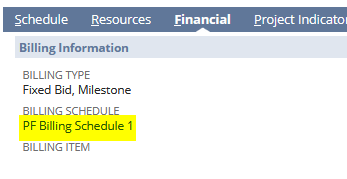
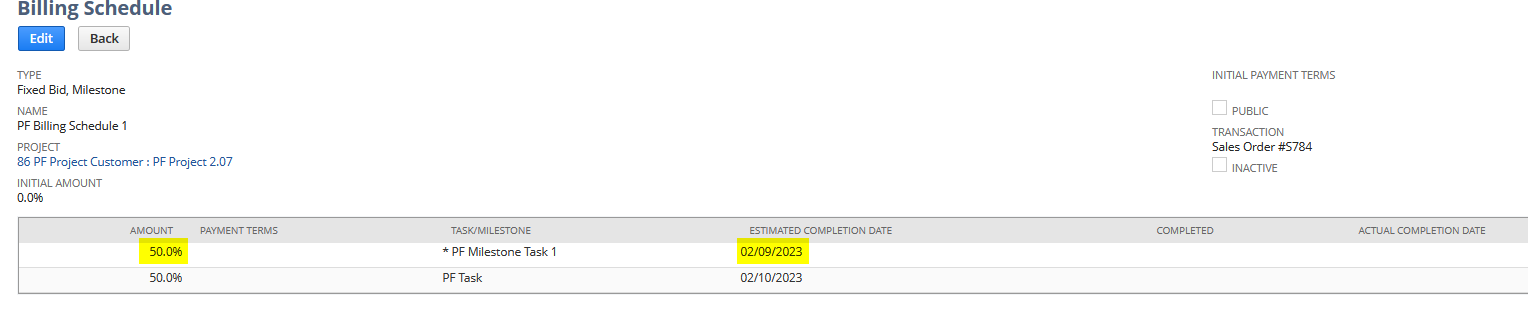
I have created a Billing Schedule for a project, with a Billing type of Fixed Bid, Milestone
The amount is divided upon completion of projects by 50%
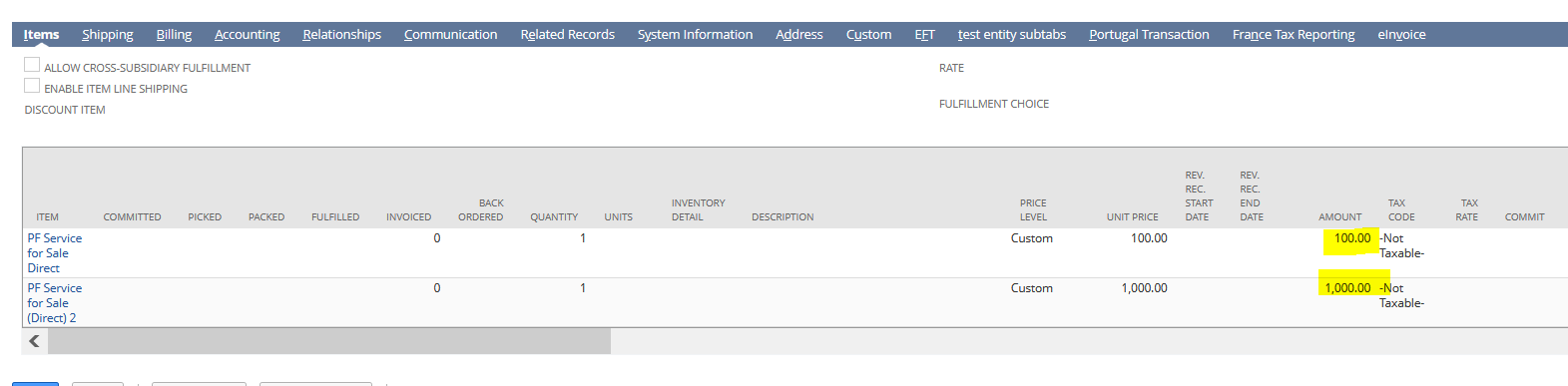
I then added a Sales Order with these items:
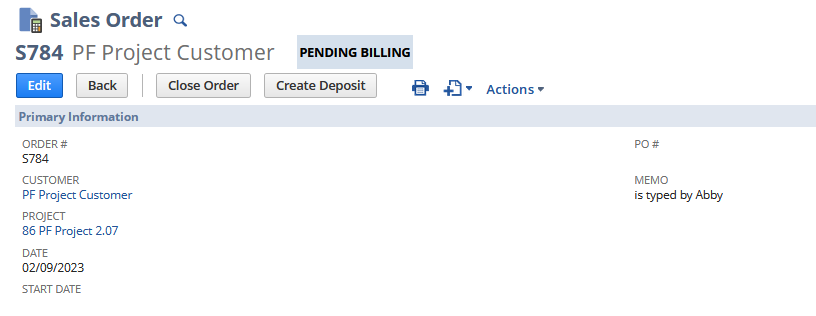
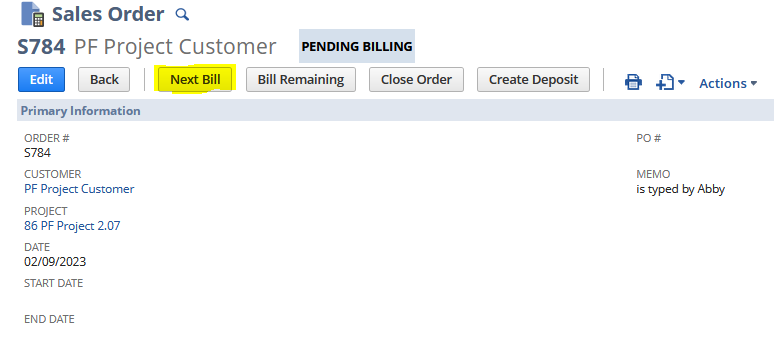
With the Sales Order does not have a next bill to it:
I then set to complete to the first project task:
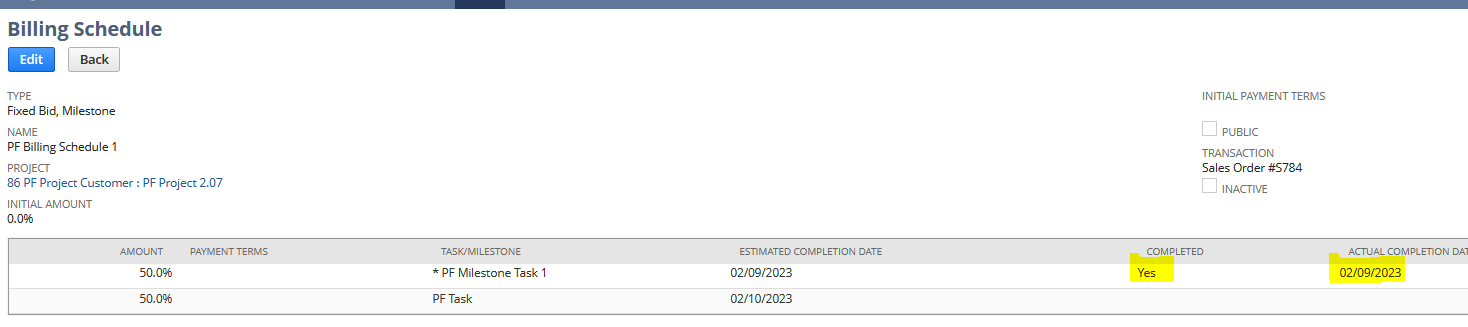
Then the Next Bill appeared in the Sales Order:
In the Invoice draft the quantity is 0.5 or 50% according to the billing schedule:
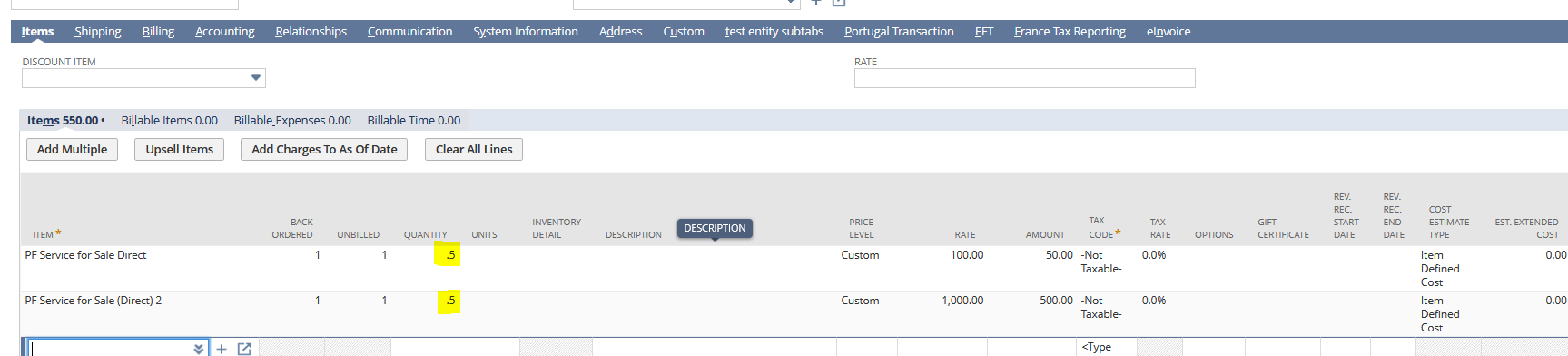
This is similar to your scenario.
I hope this clarifies 🙂
Re: Introduce Yourself!
Hey all,
My name is Joshua Dennis and I teach ERP (among other things) at Indiana University. I have been teaching NetSuite for 11 years! Glad to be here.