Best Of
Re: Does NetSuite allow to create purchase order for inactive vendors?
Hi Edo_Aroni
I found in suiteanswer seems like its possible if user use search in vendor field to find and select an inactive vendor when creating purchase order.
https://suiteanswers.custhelp.com/app/answers/detail/a_id/80904/loc/en_US
If you want to disallow this action then may be can add a return error action in workflow before record submit.
Regards,
Wee Ming
 Wee Ming
NetSuite Admin Tip | Exclude Opportunities created from an Estimate in Saved Search

Companies exclude opportunities created from estimates in their reports as they may want to keep a clear distinction between different stages of the sales process. Some companies may also want data accuracy. It helps in creating more precise reports by filtering out the opportunities that are not primary leads but rather repeat buyers.
Using NetSuite, you can exclude Opportunities that are generated from Estimate records in your Saved Searches. Here’s a step-by-step guide on how to achieve this:
Navigate to Saved Searches
1. Go to Lists > Search > Saved Searches > New to create a new Saved Search.
Configure the Saved Search Criteria
2. Select Transaction: Choose "Transaction" as the record type for your Saved Search.
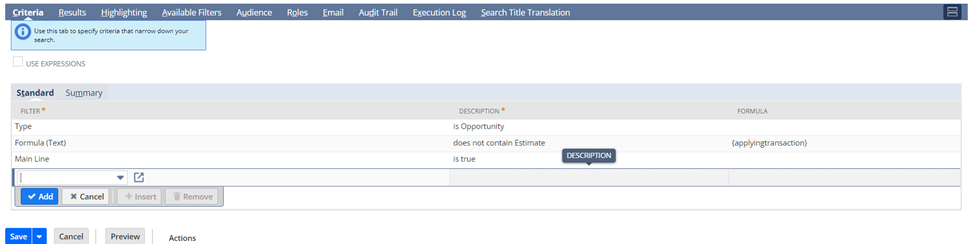
3. Criteria Tab: Set up the following filters:
a. Filter: Type = Opportunity
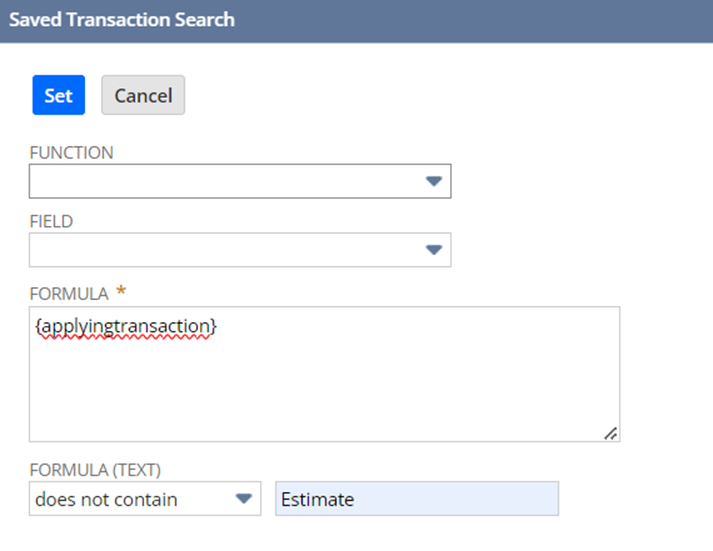
b. Formula (Text): does not contain Estimate/Quote
c. Formula: {applyingtransaction}
Configure the Results Tab
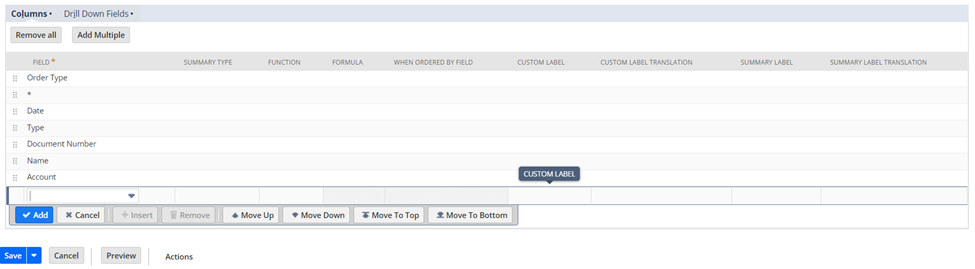
4. Results Tab: Customize the fields displayed in your search results. For instance, you might include fields like Dates, Type, Document Number, Name, and Account.
Save and Review Your Search
5. Save your search and review the results to ensure that Opportunities generated from Estimate records are excluded based on your criteria.
Sample Output:

How do you exclude opportunities in your Business? Share them in the NetSuite Admin Corner.

Re: opening a Project: get a page not found error
Support answered my question and here is the solution.
- Access his profile > Go to Personal settings under his initials JS on the upper right part of the screen
- Under the Projects Options, Set the Default tab for project records to Properties
- Click Save