Narrative Insights is Temporarily Unavailable due to an Infrastructure Issue. Learn how This Impacts Your Account and What to Expect While the Feature is Disabled.
Best Of
Re: Introduce Yourself!
Hi, I am Enrico de Marco Presentacion, I am a Technical Support Engineer for
NetSuite Analytics Warehouse, I am currently living and working in Paranaque,
in my spare time, I usually watch anime or watch comedy specials on netflix. My
Myers Briggs is INFJ.

Re: Introduce Yourself!
Hi! I'm Cherry Eunice I am a Technical Support Engineer for ERP - Advance Accounting, I am currently living and working in Manila, Philippines! just a little overview on myself, in my spare time I usually do crafts or do carpentry or just keeping busy with my hands.

Re: Introduce Yourself!
Hi, I am Mikee Uy, a Technical Support Engineer for ERP - Advance Accounting. I am currently living and working in Manila Philippines. In my free time, I like reading books and learning and improving my new hobbies like drawing and photography.
Re: Introduce Yourself!
Hi I am Arth Diaz, I use Shiru as my nickname, located in Quezon City, Philippines. I am an Associate Technical Support Engineer for CRM/Admin of NetSuite.
When not at work, I am usually playing online games or riding my motorcycle going to different places.

Re: Introduce Yourself!
Hi! I am Chrisphine Tribunal, I am a Technical Support Representative for SuitePeople US Payroll. I am currently living and working in Manila, Philippines. Just a little overview of myself, I am a sneakerhead. 😉

Re: Introduce Yourself!
Hi all
Mike here from Perth, Australia. Currently working for Thermomix as a NetSuite Administrator. We use NetSuite as our ERP, currently integrated via Dell Boomi with a custom Wordpress webstore with CRM type abilities. This will shortly be replaced with Salesforce as a CRM and Shopify as an e-Commerce platform which will both be integrated via Boomi into NetSuite.
Have recently completed my SuiteFoundation certification and studying towards obtaining an Administrator or ERP Consultant certification.
Fun fact, took two lengthy looks through this website to find out how I could change my password, ha ha.
Cheers
Mike

Re: China Localisation Bundle - Import VAT Trans file template
Thank Wee Ming and apologies for the limited support that I can provide.
However, I was able to reach out again regarding this internally.
Can you try this again?
As mentioned internally you should replace 123880 with a valid voucher internalid.
Re: SuiteAnalytic Connector - Do not have permission to use SuiteAnalytics
Thank @Veronica Steluta Mincior-Oracle ,
I just saw your suggestion , so I will follow-up with this suggestion and will update here when I have new status.
Re: How to get the value of an account balance for a given date
Hi Benjamin Paul - USA
You can create a transaction saved search below :-
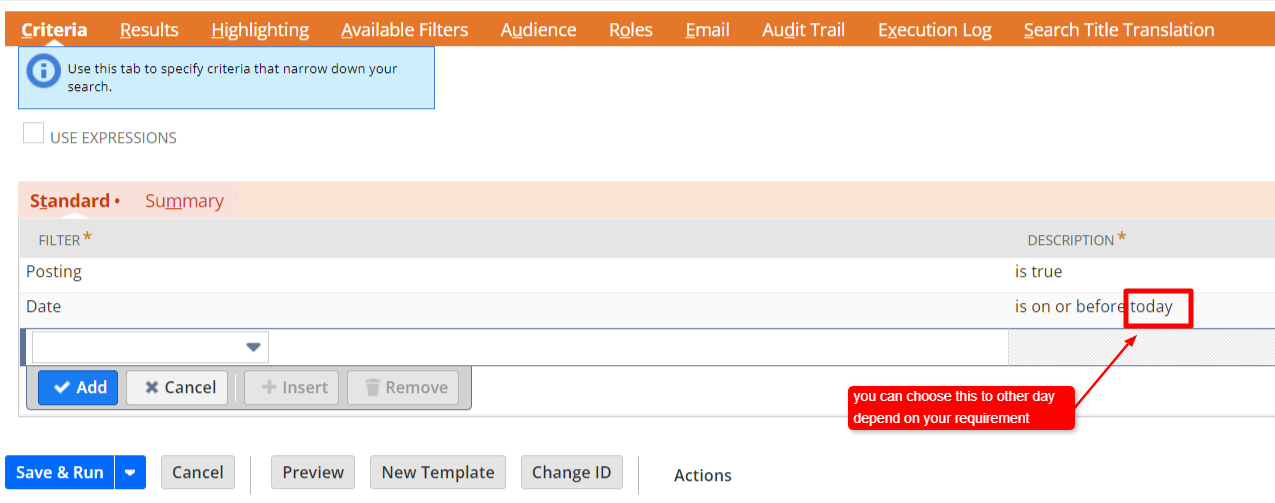
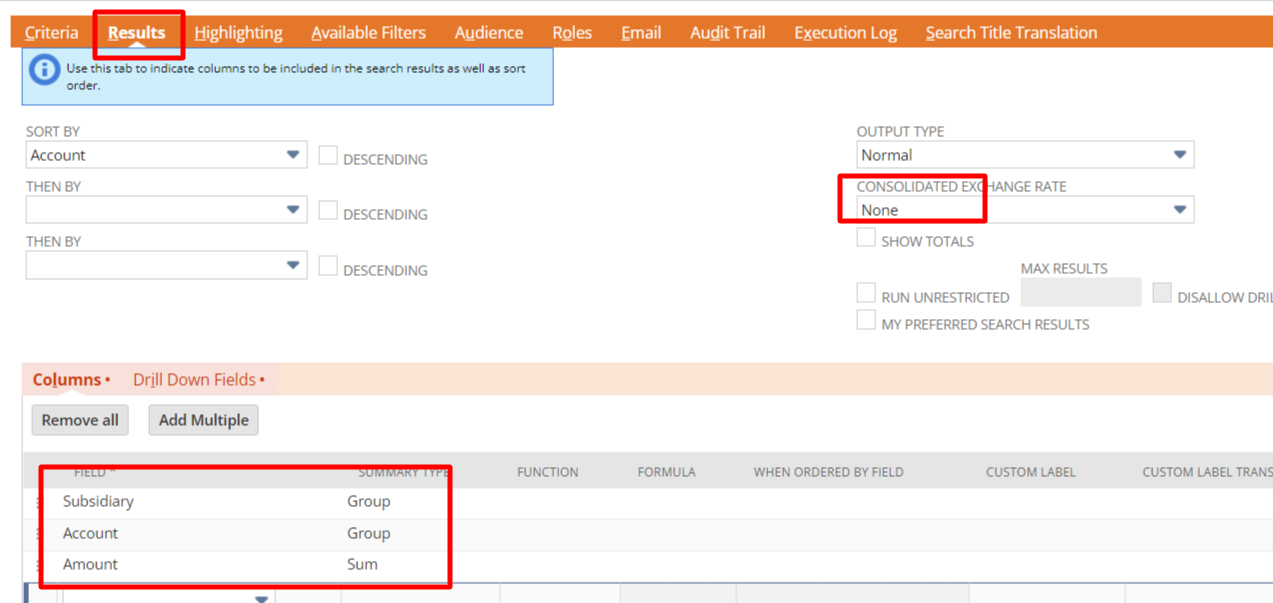
You can add more filter in the criteria is you want to filter only specific account type like e.g. Bank or for a particular Subsidiary if required
After that you can run the balance sheet as of the date same as SS to compare the figure to confirm your SS result is accurate.
Regards,
Wee Ming
 Wee Ming
Re: Error in CSV upload of Journal Entry with Segment code
Hi @Micah Timbol-Oracle - I also reached out to support regarding this issue. They asked the client to check the "Run server SuiteScript" checkbox when uploading. I have not yet received any feedback from the client again. Will get back to you on this thanks.