Best Of
Re: How to Create a NetSuite Formula to Display Blank for Project End Dates Past Today's Date?
You're welcome @CDuf I have updated the title to How to Create a NetSuite Formula to Display Blank for Project End Dates Past Today's Date?
Hi @User_8ITTC,
Will this formula work for you? 🙂

Re: How to turn off Inventory Status Control
Hi @DMurph,
This is maybe caused by existing inventory counts. Kindly do the following:
- Navigate to Lists > Supply Chain > Inventory Statuses
- On the Inventory Statuses Page, right click on any part of the page > Click Inspect > Click Console
- On the Console, kindly paste the details below:
var filters = new Array()
filters[0] = new nlobjSearchFilter('custrecord_sc_inventory_status',null,'anyof',['2','3','4','5'])
var columns = new Array()
columns[0] = new nlobjSearchColumn('internalid')
columns[1] = new nlobjSearchColumn('custrecord_sc_inventory_status')
var searchResultObj = nlapiCreateSearch('customrecord_sc_item_count_details', filters, columns).runSearch()
var resultObjects = searchResultObj.getResults(0,100)
for(i = 0; i < resultObjects.length; i++)
{
console.log(resultObjects[i]);
nlapiDeleteRecord('customrecord_sc_item_count_details',resultObjects[i].id);
}
- Once pasted, click enter and wait for it to finish, then refresh the page.
After the steps above, you may now delete the non-default status:
- Open [non-default] Status
- Click Edit
- Click on Actions, then click ‘Delete’
You should now be able to delete the [non-default] Status.
To disable Inventory Statuses, kindly perform the following steps:
- Navigate to: Setup > Company > Enable Features
- Click on the Items & Inventory Tab
- Look for and uncheck Inventory Status
- Scroll to the Top of the page and Click Save
The Inventory Status should now be disabled on the account.

Re: Revenue Arrangement Issue
That's very helpful thanks both! I've learned a lot about this subject over the past few days!!

Re: How to Create a NetSuite Formula to Display Blank for Project End Dates Past Today's Date?
Hello again @User_8ITTC,
Can you try this field and formula instead?
Formula (Text) | Formula: CASE WHEN {custentity_project_end_date} < {today} THEN ' ' ELSE TO_CHAR(ROUND({custentity_project_end_date} - {today})) END
I hope this helps! Please let us know.
==========
If you find this reply to your question as helpful, others with the same question might find it helpful as well. By marking “Yes” on the “Did this answer your question?”, you’ll be able to aid the community to find the solution much easier and faster without the need to read through all the replies
Re: Is it possible to upload a folder of files directly to a record e.g. customer or vendor?
I know this is an enhancement request & I hope you voted for it and provided a business case as to the burden of not having the enhancement and benefit of having it.
We use Celigo CloudExtend, currently the Google Workspace version but previously the Microsoft 365 version & both overall, worked the same way. The MicroSoft 365 version is more feature rich, however.
We store our executed contracts on a shared google drive and link the folder to the necessary NetSuite record.. (We used to store on Microsoft OneDrive and worked the same way.)
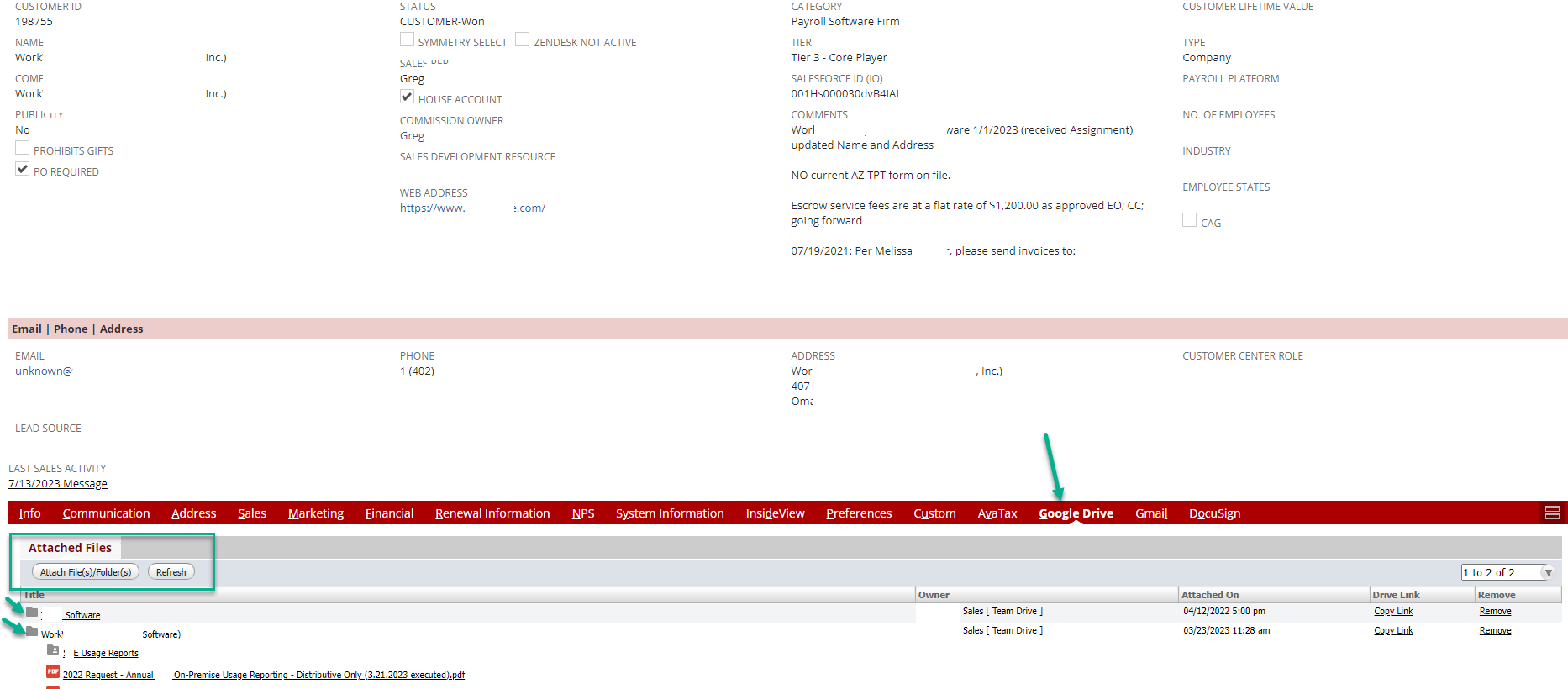
Once the folder is on the NetSuite record (Entity, Contact, Transaction, etc) you can also drag & drop any new files to the folder on the record & it is stored in the source folder on our Google Drive….
You might think about it. It's relatively inexpensive.
Below is a link to some related videos
https://www.youtube.com/results?search_query=cloudextend+netsuite
If you want/need anyone's contact information, let me know.
 CDuf
CDuf
Re: Electronic Bank Payment PSG Shared bundle not found?
Hi all,
Yes, I was able to install the bundle #509148 yesterday.
Hope that helps!
 Vanessa_
Re: Revenue Arrangement Issue
I can't recall if I ever tested this on historic transactions. It probably won't impact anything historical. If you have a Sandbox, you can try it there.
The other option is to create RMAs for the applicable Sales Orders.

Re: Revenue Arrangement Issue
Hi @User_KBEB1,
As per SuiteAnswers Id: 80840, "Any changes made to the Create and Maintain Revenue Element Upon Closed Sales Order preference is prospective in nature" This means that it will only affect those transactions closed after the changes to this preference.

Re: Is it possible to create an audit report for activities on File Cabinet ?
Hi- Yes, this is possible. Using a System Note Search, you can isolate the notes to be only on 'Files'.
Good Luck!
~angela
