Best Of
Re: Picking Ticket blank column
Hello @OliverK,
I have tried the code on my test account and it works on my end. We need customize the Sales Order form and show the Committed field under Sublist fields. Kindly check the steps below:
- Open the Sales Order
- Navigate to Customize > Customize Form
- Click Sublist Fields
- Mark the checkbox beside Committed
- Click Save
Please let me know if this solved the issue.

Re: Sales order line level Billing schedule with different start date
Hello @Hormese Paul ,
Unfortunately, it seems to be a limitation of our system. Please, find below the Enhancement request created for this functionality:
# 76554 Sales Order > Items tab > Line Items > Set Billing Schedule Start Date and End Date.
Currently the Billing Schedule Start Date cannot be set per line level, the only possibility is to create separate Billing Schedule for each line or use Recurrence Frequency.
You may vote for this enhancement through SuiteIdeas to increase its points and have it possibly included on NetSuite's future releases.
Thank you for your understanding.
“Kindly click "Yes" on "Did this answer the question?" if you find the reply on your thread helpful. This will aid the others with the same question to easily find the correct answer. Thank you!

Re: How to show/hide fields between company/individual on lead/prospect/customer
Hello @User_75YL8,
Good day! ?
Upon checking, there's no standard way to hide certain fields on the Lead form depending on the Type selected. However, I was able to create a Workflow that gave me the desired result. You can check this on your end as well.
Note: The Workflow below will hide the Sales Rep field on the Lead form when the Type is set to Individual. You can change the field as necessary.
- Navigate to Customization > Workflow > Workflows > New
- Set the following fields on the Basic Information:
- Name = set the name of the Workflow as preferred
- Record Type = Customer
- Sub Types = Lead
- Execute As Admin = checked
- Set Initiation = Event Based
- Under Event Definition, set the following :
- On Create = checked
- On View or Update = checked
- Note: Check the 'On View or Update' box if you would like to run the Workflow on existing records
- Trigger Type = ALL
- Click Save
- Click on the State 1 box
- At the right-side of the page, click on the New Action link
- Select Set Field Display Type
- Note: This action would set the Sales Rep field to hidden when Individual is selected.
- Set the following fields:
- Trigger On = After Field Edit
- Triggering Client Fields = Is Person
- Set Condition as below:
- Field = Is Person
- Compare Type = checked
- Under the Parameters section:
- Select Sales Rep on the Field drop-down
- Display Type = Hidden
- Click Save
I hope this helps and will work on your end. It would be best to reach out to your in-house developers to further discuss if you have other business requirements.
If you find this reply to your question as helpful, others with the same question might find it helpful as well. By marking “Yes” on the “Did this answer your question?”, you’ll be able to aid the community to find the solution much easier and faster without the need to read through all the replies.

Re: Override Period Restrictions - Not Working
Hi @Patrick Fresnosa-Oracle , Thank you for your great details
Hello@User_XQ321
Additional Point for Allow transactions outside of the posting period having Override period restrictions:
Make sure that you should enable the Accounting preferences under General for " Allow Transaction date outside of posting period. There are three options Disallow, Warn and Allow.
If you select Disallow: users are not allowed to save a transaction unless the transaction date is within the date range for the posting period selected.
Warn: Users are warned when a transaction date is not within the date range for the posting period selected, but they can click Ok on the warning and save it anyway
Allow: Users can enter a transaction even if the date is not within the date range for the posting period selected. No warning is given to the user before the transaction is saved.
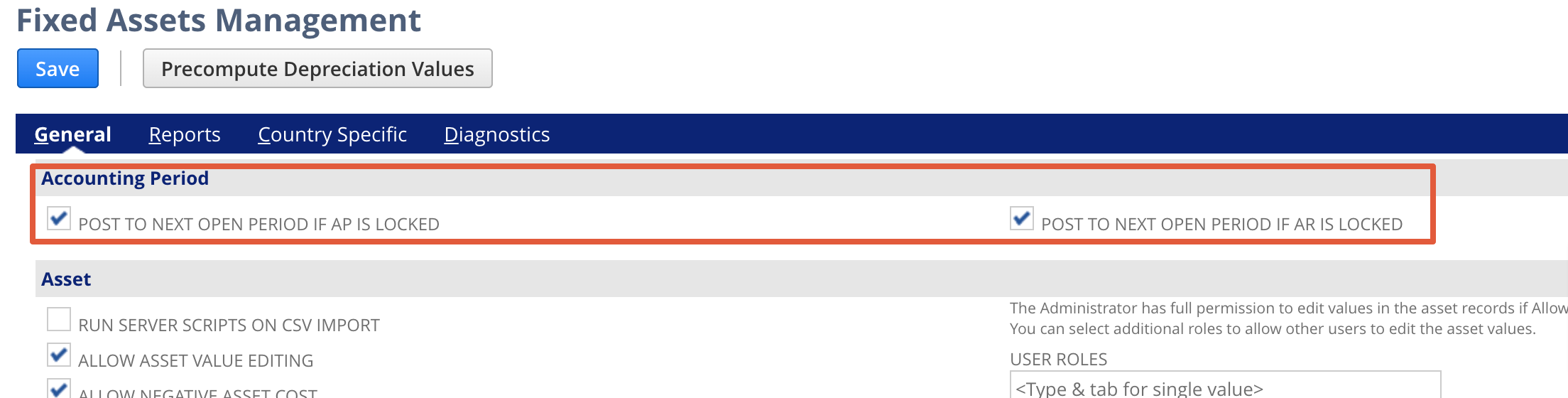
The above scenario is for normal transactions. For the FAM scenario if you enable the below checkboxes under the FAM setup. Automatically system will post the transactions to the next open period even though you have override period restriction permission.
A date will be the previous month-end date and the posting period is the current period

Re: Receive and deliver items as logistic service
Hi @Amjad Kasem,
Thanks for creating another post here in our community! ?
I checked on your concern and it seems that there is no standard/native NS transaction that caters specifically for this one.
The closest I can think of is the use of Drop Shipment or Special Orders. However, I think that these will still require you to create Bills and Invoices, but you have the option to Close the orders
Another one I can suggest is to use Inventory Adjustments to add and remove the items from your warehouse. Note that this will have impact in your inventory.
Another option would be to create Custom Records in order to track these transactions.
As for the service charge, we do have Service Items and Other Charge Items which you can use in Bills or Invoices.
Since this is a specialized process, I think that you would need to also create your own internal process or workflows for handling these transactions. I linked the SuiteAnswers articles so you can review related information.
Hope this information helps.
To other members, feel free to comment your insights and suggestions about this process as well.

Re: Remove/hide SUBSIDIARY CONTEXT field information from reports
Hello @CharleneJ
Currently, Users only have the capability to edit the name of the report. To modify the subsidiary context and edit the details in the title is still a system limitation. It is logged as Enhancement #133607.
Re: Changing Subsidiary Currency
Hi Patrick:
Just voted for the idea. There are only 86 votes on it, so it doesn't look like a priority issue.
As for changing the currency, I think it should be possible if literally nothing else is done in the system afterwards. I am saying this because I found an suite answer that says if there are no transactions, you should be able to change the currency.
The problem was that I created a few more entities. Though these are not transactions, of course, they may have interfered with the process, I believe.
But, luckily, deleting worked.
Thanks!
 Vusi
Vusi
New to NetSuite | How to Create a Classification For Reporting That Defaults From Department
The need for creating a classification (i.e. Region) for reporting, and automatically default it from another segment (i.e., Department) on all transaction lines, is a business requirement commonly found in companies where Department is actually a Cost Center that reports to a single Region or Business Unit. We can do this without having to develop a SuiteScript.
In this example, Region will be automatically defaulted from Department for transactions entered via UI, CSV Import, as well as Integration through Web Services. In addition, Region may be overridden, which is convenient for importing historical transactions where a Department or Cost Center was part of a different Region.
- Click Customizations > List, Records, & Fields > Custom Segments > New
- Label: Enter ABC Region
- ID: _abc_region
- Show in List: Remove checkmark
- GL Impact: Remove checkmark
- If Department is enabled to show on main line, click Transactions subtab:
- Source List: Select Department(main)(Department)
- Select all applicable transactions
- Click Transaction Columns subtab:
- Department(Line)(Line)(Department). Click Ok at the prompt indicating that a Region field will be created on the Department record.
- Under application select applicable sublists, for example:
- Sale Item
- Purchase Item
- Expense Item
- Under Record Type, select applicable transactions, for example:
- Expense Report
- Item Receipt
- Journal Entry
- Enter a transaction to see how Region is automatically defaulted from Department.
- Update Departments with Region
- Click Setup > Company > Departments
- There should now be a Region column
- Create Regions records
- Click Setup > Company > Regions
- Click Save
- Click Permissions
- Configure permissions for each Role.
- Click the rest of the subtabs to select applicable records, if needed.
- Now Region should show on all transactions and financial reports.

Re: Electronic Documents and Mexico Localization bundles are very slow
Hi @User_L22NI
May I ask how you're getting the error: "SSS_REQUEST_LIMIT_EXCEEDED"? Are you processing Invoices/Transactions through RESTlet or SOAP Web Services?
This error isn't necessarily related to the managed bundles. It's specific to concurrency for RESTlets and SOAP Web Services. Each NetSuite account has concurrency limits when it comes to integrations and when parallel requests are sent more than the account's limit, this error is encountered.
I hope this helps.
Best.
Re: Search for PO pending Receipt but paid fully
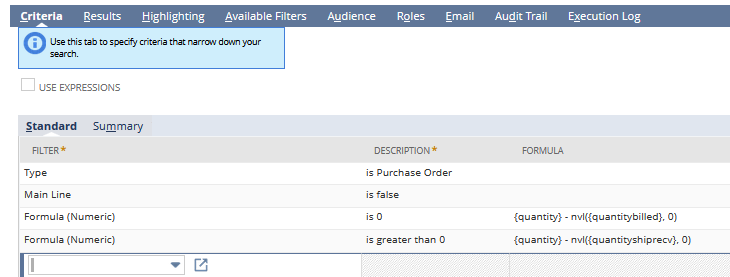
Here is one example of Criteria that will list PO lines that have been fully billed but the quantity received is less than the quantity that was ordered.
The first criteria formula selects lines that are fully billed. The second formula selects the unreceived lines