Best Of
Re: INVENTORY TRANSFER IMPORT ERROR
Hi Aldarmseu,
If your CSV Import fails and you see the error: Please enter value(s) for: Status, check the item record and make sure that the current quantity on hand is not zero or already underwater and that you are not making a negative adjustment.
The error prompt is related to the quantity on hand. You cannot do a negative adjustment when you no longer have any available quantity. The reason why the error is related to Inventory Status is because it is the next field needed to be populated after the item line level but the system can no longer proceed.
The solution is to remove lines in your CSV Import that will process negative adjustment for inventories without enough quantity.
This is also documented under SuiteAnswers ID: 78035.
I hope this helps!
=========================
If you find this reply to your question as helpful, others with the same question might find it helpful as well. By marking “Yes” on the “Did this answer your question?”, you’ll be able to help other community members who might have the same concern find the answer easier and you will also get closer to earning your next Answer Accepter badge.

NSC | Sales Order > Difference Between Next Bill and Bill Remaining

Some users are reporting that they are encountering unexpected amount when billing a Sales Order. One possible cause is the button they used when billing. Here's the difference between the Next Bill and Bill Remaining buttons you see on Sales Orders.

Both the Next Bill and Bill Remaining button relates to the Billing Schedule. When you view an open Sales Order that has an attached Billing Schedule, you can use the Next Bill and Bill Remaining buttons to generate Invoices as follows:
- Click Next Bill to generate an Invoice that bills the next cycle.
- Click Bill Remaining to ignore the Billing Schedule and issue a single Invoice for the total outstanding amount.
I hope this helps! ❤ Feel free to share your own tips and tricks under NetSuite Admin Corner to help other members as well. Thank you very much! 😊

Re: Hide Last Sales Activity
Hello @User_75YL8,
Good day!
Is this the Last Activity field found in Customer record? You can hide this by undeploying a script by following the steps below:
- Navigate to Customization > Scripting > Script Deployments
- Locate customdeploy_lsa_ue_customer (internal ID: 11)
- Click on Edit
- Uncheck Deployed
- Click on Save
After making this modification, you will be able to see that the field has dissapeared from the Customer Forms.
Kindly discuss this first internally before undeploying the script.
Note: Please, consider that if you undeploy this script you will not be able to track the last sales activities for Customers (Leads, Prospects and Customers).

Re: WRONG INVENTORY DETAIL VS QTY ON ITEM RECEIPT RESULTING IN DIFFERENCE IN ON HAND AND AVAILABLE QTY
Thanks for sharing your insights, @Matrim! Appreciate your help.
Hello @Aldarmseu,
Since I am not able to change the quantity in my item receipt and could not force mismatch between my On Hand and Available quantity (unless I turn Use Bins on and off which would not be relevant in our investigation since solution would also be turning Use Bins on and off), can you check on your end if Inventory Status Change is feasible?
As far as I know, we won't be able to proceed with an Inventory Status change if the quantities are not assigned with any status since the Previous Status field is required.
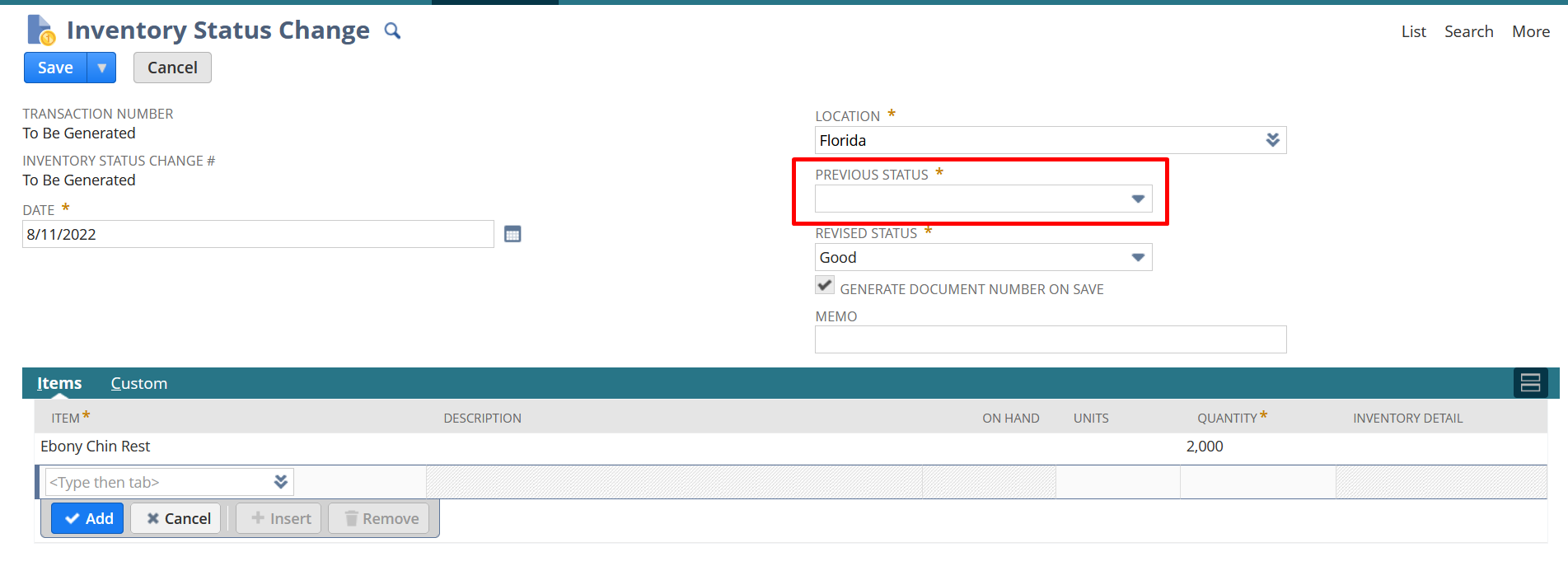
Let us know how it goes.
Just in case the Inventory Status Change would not work, can you also share the screenshot of your Item Record (both Purchasing/Inventory > Location sublist and Inventory Detail > Inventory Statuses sublist). Just make sure to hide confidential information when sharing screenshots.
Thank you!
Regards,
Joy

Re: Is there any way to notify an user when the billing milestones are checked in the sales order ?
Hi Raghu007,
Users can navigate to Transaction -> Sales -> Invoice Sales orders. This page will show only transaction against which Invoices can be created as per Billing Schedule.

Re: Standard field to be made disabled
Hi User_MHNLE,
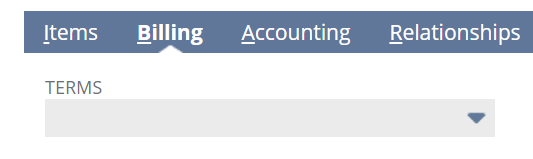
On customizing the form, I set the TERMS field to disable and refreshed the page. I was able to disable the field.
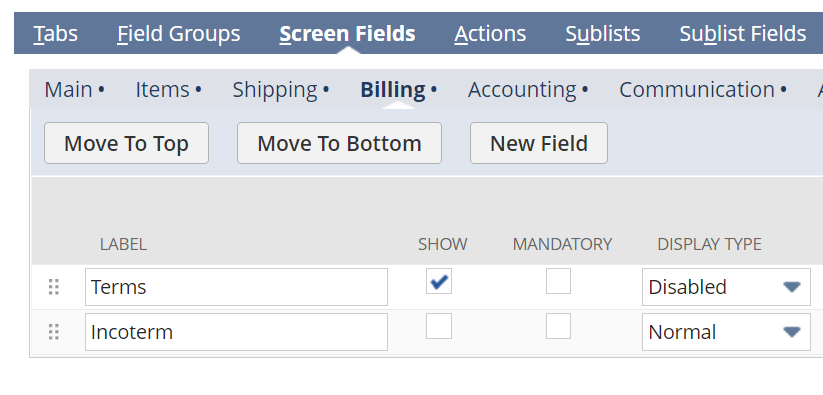
PO form :
Re: Intercompany sales and COGS account
HI User_Q1DPO,
These are intercompany accounts which are automatically impacted when you follow the NS standard intercompany PO SO process.
Hope this helps.
Thanks
Re: GL Account Currency cannot be changed
Hi Kedalene
Yes, absolutely you can create GL accounts without currency to allow posting in any currency. Exception being Credit Card and Bank GL type accounts.
Thanks
Re: How do I update our logo on our customer invoice templates?
Usually the logo is uploaded to a folder in your File Cabinet and then selected for use by following Setup > Company > Company Information.
To check what folder your logo might be in:
Go to Setup > Company > General Preferences> Company logo folder
 Tafara
Re: How to recover netsuite domain password?
Hi Dave Rusk,
Had you stored your password earlier on your browser. If yes, you can retrieve the password using inspect element functionality of browser.
If not saved, an administrator person with access to all your account can reset your password by navigating to your employee record or directly send you the reset link.