Best Of
Re: Saved Search to list all Active Employees with Terminated Supervisor
Hey @LSoor,
NetSuite Saved Searches doesn't have Employee to Employee Supervisor joins.
To achieve what you are looking for, you have to do the following:
- Create a custom Supervisor field on the employee records.
- Source the Supervisor to the custom field (via field sourcing or via Workflow)
- Use the custom field as a join in the Saved Search to exclude "Terminated' employees

WebStorm removing available without login
I'm using the WebStorm SuiteCloud IDE plug-in and it's worked fine all along. We were updated to NS 2024.1 this past Monday. The plug-in stopped working because I was using the 2023.2 version. It started working again after updating the plug-in.
The problem I'm having now is that uploading any file using the plug-in, that isn't a SuiteScript file, has it's "available without login" checkbox cleared. I'm referring to any html, js (vanilla, non-SS), etc.
I can replicated every single time by checking the box in the file cabinet and saving it. As soon as I upload the file via the plug-in, the checkbox gets cleared.
Is there some kind of new setting in 2024.1 that I need to enable? A setting I'm missing in WebStorm? Or is this a clear bug with the plug-in?
 luisjg
Re: In a Saved Search can I filter Purchase Orders that have a Vendor Return Authorization
YES! Thank you.
I was able to use it in the Summary Criteria to do exactly what I needed to.
Thanks Again!
 Dustin S
Re: SHORTCUT PORTLET
Thanks to all who answered my crazy question! I appreciate it! Just didn't see the SHORTCUT on the dashboard. I think I need a couple days off!
I hope everyone has a lovely weekend and thanks again!
 LisaNC
Re: Netsuite Servers running slow?? Back end and website
Yes, we did everything. Still was slow, but seems to be better today. So must have been just a 1 day slow down.
 KennyT
Re: Consolidated Exchange Rate - average rate for Statutory books
Hi @User_9AUJK,
I hope you are doing well.
Were you able to click the calculator button for each of the accounting books?
If the Statutory (Secondary) Accounting Book is different from that of the Primary Accounting book's Consolidated Exchange Rates, there are various reasons:
- Revenue recognition and expense amortization features are book-specific. Check if each books have different allocation methods. It is possible that the revenue recognition or Amortization feature may have a different computation or calculation. Your Recognition Accounts may be using Average Consolidated Exchange Rate
- Book Specific journal entries that may be posted to your statutory accounting book, that affects your Average Consolidated Exchange Rate
- Check if historical transactions are processed in the secondary accounting books (For HTP)
You can also check this one 🙂
NetSuite Admin Tip | How to Verify the Computed Average Consolidated Exchange Rate

Re: SCA|Incorrect Tax calculation in SCA website?
Hi @Richard James Uri-Oracle
We have raised the support ticket, but till now we have not received any solution. Once we receive it, we will let you know over here.
Best regards,
Shubham Singh.
Re: Get the Sales Order # onto Customer Statement PDFs?
Hi @User_XJTDZ, printing Sales Order number in Statements is not yet available (see SuiteIdeas: 166706). I am seeing some users use custom fields instead. Some use workflow to copy the value from Created From to the field, then printing it via custom field.
Make sure your custom transaction body field Applies To> Print on Statement is checked.

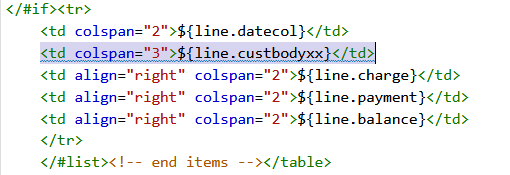
On the Statement, the tags would look like this:

Re: Turn off Prompt on purchase orders
Hi, Everyone! @User_309CB needs our help. Don't hesitate to contribute your knowledge and best practices.
--
In case you know someone who is new to NetSuite, we encourage you to direct them to our newly launched "New to NetSuite" page. This page is specifically designed to offer them information and guidance and help them make the most out of their NetSuite journey. Click here for more details.

Re: Deleting Rejected Bookings
There is a free bundle by RSM 'Mass Delete With Saved Search' (234093) that works to delete multiple records using a saved search.
Install the bundle, create a saved search of records to delete, add the search internal ID to the script deployment, and watch the records go away! Its a slick way to remove as many records as needed, quickly.
Not sure if it helps, but thought I'd let you know.
~angela
