Best Of
How to use the Custom Attribute Mapper (CAM)?
Custom Field on T-Type
A custom field defined on a transaction type “t-type” such as purchase, sales, opportunity, journal etc.
NetSuite Definitions are found under: Customization >Lists, Records, & Fields >Transaction Body Fields and Transaction line fields
· Body Fields names start with custbody_
· Line Fields names start with custcol_
Steps:
1. Determine all T-Types relevant to the field
a. In NetSuite the field will be defined at a higher grouping such as SALES
b. However, in NSAW it is required to define at the t-type level such as Sales Order, Purchase Order, Item Receipt etc.
2. Map the field to each relevant T-Type at Transaction (body) or Line level
a. Custom Attribute Mapper creates an extension table. The custom field is created in the extension table as a column with the same name as the custom field. The extension table joins back to the t-type fact table. Body extensions join with ID. Line extensions join with TRANSACTION AND ID.
Custom List/Record/Segment on T-Type
Same as above but based on a Custom List/Record/Segment.
Upon completion the Custom List is visible in the Subject Area in its own folder at the bottom of the model
The Custom List is visible in the Subject Area in its own folder at the bottom of the model.
Custom Field on Entity
Custom Fields assigned to Entities such as Customer, Vendor, Item.
NetSuite Definitions found under: Customization -> Lists, Records, & Fields -> Entity Fields and item Fields
· Entity Fields star with custentity_
· Item Fields start with custitem_
Upon completion entity fields are found under the corresponding entity folder
Custom List/Record/Segment on Entity
Same as above but based on a Custom List/Record/Segment.
Upon completion the field based on the Custom List is visible in respective Entity folder
Customization on Standard Record
A Standard Record in NetSuite that is neither an entity nor a t-type. Example Classification or Account.
These can be defined in Custom Attributes Mapper, Attribute Type -> Other Record
Configuring Custom Attributes Mapper
1. Click Data Configuration on NetSuite Analytics Warehouse Console >Custom Attributes > Create
2. Select attribute and source
3. Save and publish
4. Monitor queue by going into Request History on the NetSuite Analytics Warehouse console

Re: How to add a Billing Schedule filter to a Sales Report?
Hi @BenjaminJ ,
Glad to have you with us today and thanks for posting here in the NetSuite Support Community!
Greetings, everyone! We have a fellow member who could use our assistance. Please don't hesitate to share your knowledge and insights to help them out. Your input is highly valued and appreciated!

Re: Journal creation (insertion/Entry) via API
Hello @Lafi Abdellatif,
tagging here our top contributors in case they've tried this integration before:
@Amanda Edwards @CDuf @Dext3r @Tigran Shahnazaryan @Nayeem Rahman Shaik @Midhun Nath @Hormese Paul @Vernita
Hello everyone, please provide your insights if you're familiar with this integration. Thank you so much!

Re: Project Tasks availability in Webservices
Yes, according to documentation.

Re: Email reminder functionality of a saved search
Hi @User_Q3A12
Use Recipients from Results subtab:
To target recipients based on values of search results fields, click the Recipients from Results subtab.
I can see that users who created these PO/VB are part of this search.
On each scheduled date, separate email messages are sent to all recipients who match search results values for the selected field(s). Each message includes only search results with values matching the recipient. By default, each recipient receives one message with a summary of all matching results.

Re: Saved search for transactions in draft state
Hi @User_EIB67
No, SuiteApprovals does not support these saved search filters.
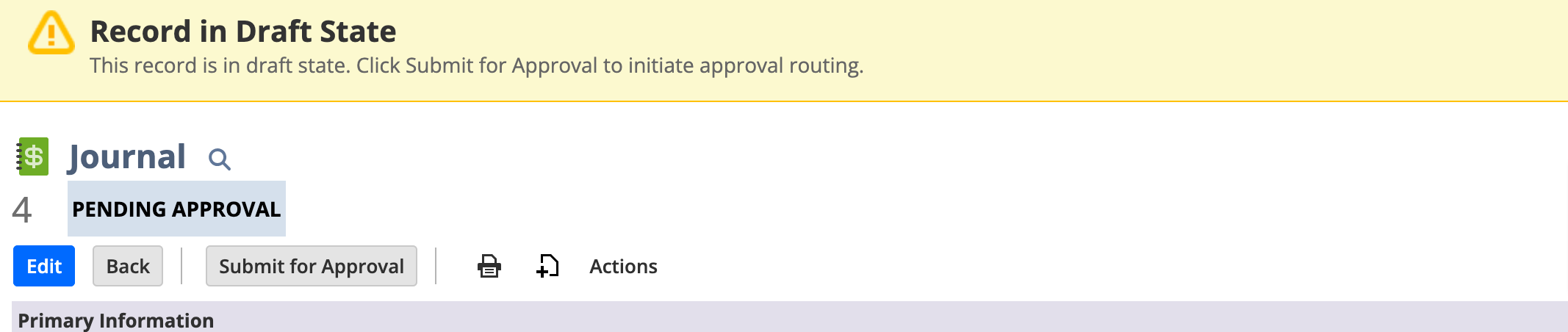
You can see only record status is draft state
In SuiteApprovals we have below states only depending on the result of amount validation, approver validation, or approver actions
Pending approval
Approved
Rejected
Resubmitted and
Cancelled

Re: Asset lifetime of asset and type does not match:
Hello @T.S
Yes check asset type system notes and take note of the date the asset lifetime was changed and navigate to
fixed asset proposal history and check the date of proposal
Re: How to manage multiple bank details information in customer record
Create the entity custom subtab as " Bank Information"
Go to Customer, vendor, employee records, customize the form and add the subtab with custom record details