Best Of
Re: Project Tasks availability in Webservices
Hi,
Upon checking, in SOAP and REST, the Project task field is not included in the purchase order reference page. However, ProjectTask record is exposed.
SOAP
- purchase order reference page.
- ProjectTask reference page.
REST
- purchase order reference page.
- ProjectTask reference page.
Thank you!

Re: Project Tasks availability in Webservices
Hi @Vernita as per @Richard James Uri-Oracle the Project task field is not included in the purchase order reference page. However, ProjectTask record is exposed.

Re: Project Tasks availability in Webservices
Hi @Vernita
When creating a purchase order via SOAP or REST, it is typically possible to populate the project tasks field at the line level. The specific method and parameters may vary depending on the API and integration being used. You would need to refer to the documentation or API reference of the particular system or platform you are working with to understand the exact procedure for populating the project tasks field.
Regarding the thread you mentioned, if it states that the project tasks field is not accessible via CSV uploads, it means that when importing data using CSV files, the project tasks field may not be included or supported for direct population. In such cases, API-based integrations would be the recommended approach to populate the project tasks field at the line level of a purchase order.
Hope it is helpful!
Re: What are best ways to check performance of customer NetSuite account
Hello @Naresh-Oracle,
I consulted this with our Performance Team and here is their feedback:
APM is the customer facing performance monitoring tool. They should be able to investigate their UI transaction records using it. If they have questions about the output of APM, they can file a case to get an explanation.
If they are concerned about bundles, then then would want to use SuiteScript analysis tool to check the various scirpts deployed by the bundle, as well as any saved searches from it, in the various contexts using APM.
There isn’t a summary provided by bundle from the tool, but it can be used to investigate those.
I hope this helps.
If you find this reply to your question useful, others might as well. By clicking the “Yes” button for “Did this answer the question?” below, you’ll be able to help the community members who might have a similar concern find the answer easier and you will also get closer to earning your next Answer Accepter badge.

Re: SuiteScript - How do I iterate and get serial numbers in the item detail from an Item Receipt?
Hi, Were you able to check this? Thank you!
Re: SuiteScript - How do I iterate and get serial numbers in the item detail from an Item Receipt?
Thanks for clearing that up, and sorry for the misinformation. Indeed, the inventory number is located within the inventory details, as indicated in the records browser.
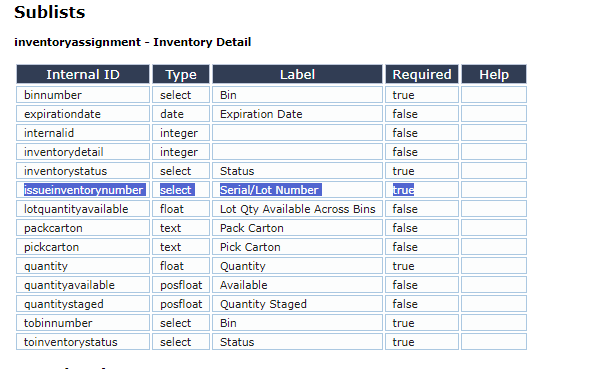
Additionally, could you please attempt to mimic this simple script initially, and add the 'issueinventorynumber' field if we are able to obtain the serial numbers? See Set the Value of the Inventory Status on the Inventory Detail for an Item Receipt Item via Script
Re: Reversal Date is in a Closed Accounting Period
Hi @Kedalene, on the Manage Accounting Periods page, you can check if you have accounting books and calendar to choose from. You can select one by one to see if the period is open for posting:
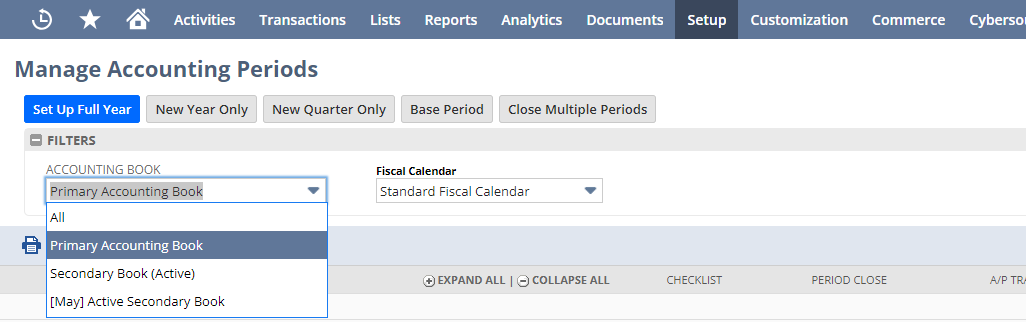
Hope this clarifies. Thank you!

Re: ref no. on expense report line
Hello, everyone! We invite you to join the conversation and share your valuable insights with us.
--
In case you know someone who is new to NetSuite, we encourage you to direct them to our newly launched "New to NetSuite" page. This page is specifically designed to offer them information and guidance and help them make the most out of their NetSuite journey. Click here for more details.

Re: Webstore Orders :Invalid tax amount in purchase card level2 data
Richard,
I created a support ticket on May 3rd, but I wanted to see if anyone else is having this issue. Netsuite, Soulpay and Avalara have all been involved in trying to figure out the error.
Thanks

Re: Resource Allocation Planning/Allocation and Chart
You can import Resource Allocations in bulk via Setup → Import/Export → Import CSV Records → Activities → Resource Allocation
Required resource allocation fields are: Resource, Customer:Project, Allocate, Allocation Type, Start Date, and End Date. These will be the columns on the CSV Import Template.
