Best Of
Re: Change / Update the Saved Report link the Customer Dashboard link
@Chandanesh When you add this option into any customer dashboard, it will dynamically reflect the changes across all customer's dashboards.

Re: How add the 'Item Last Purchase Date' to the Saved Search
Hey @Ivan Babiichuk,
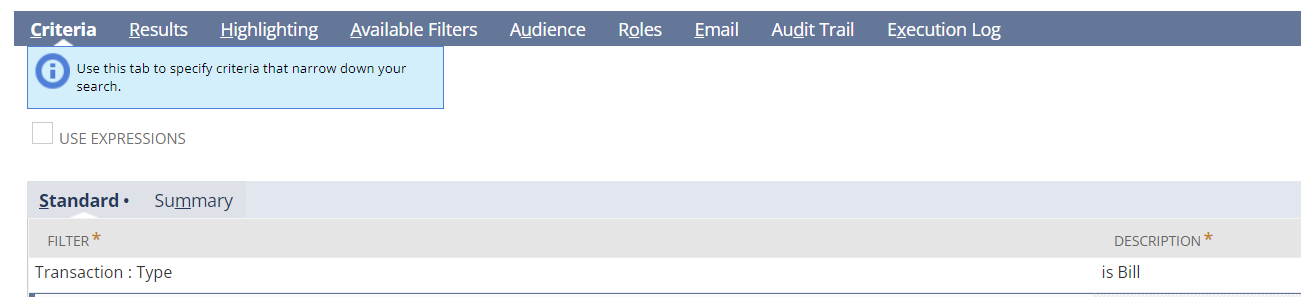
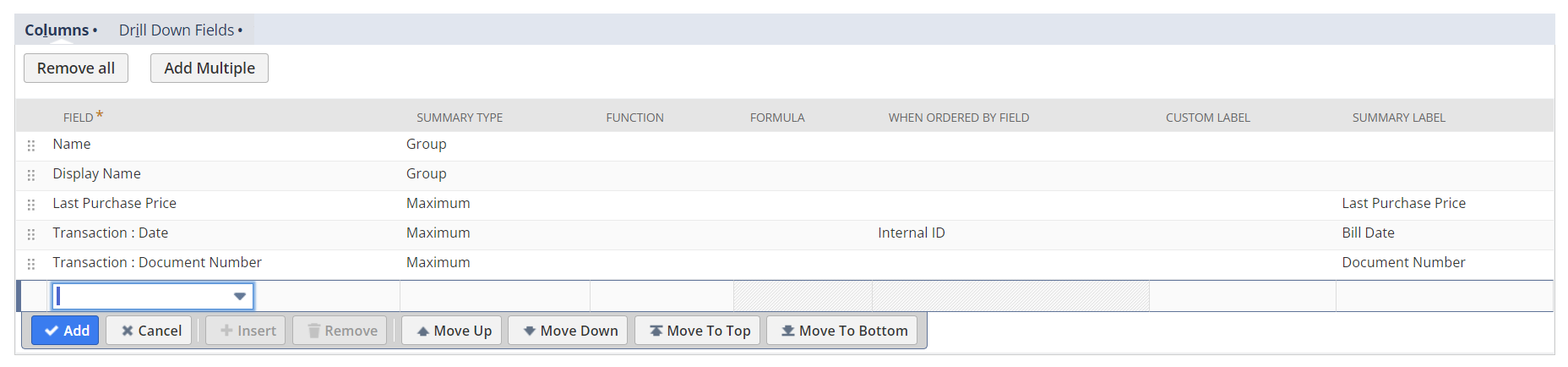
You might be able to do this via Item Saved Search and Transaction join. Here is an example:

Re: How to copy complete data from one NS account to another
Hello,
There is no way I am aware of to copy data from one account to another, it must be migrated - meaning that it needs to be reconfigured and the data imported.
There is no way to 'Restore' a sandbox.
You can purchase multiple sandbox accounts, that will allow you to retain the data within one sandbox while refreshing the other for current needs.
Sorry that it's not the answer you want.
~angela

Re: Change Fiscal Year View---Income Statement report
Hi @User_FL4CK per checking, you should be able to view the report with different fiscal calendar. The standard behavior of the system is that it will change its FROM and TO fields if user will change the SUBSIDIARY CONTEXT with a Subsidiary that has a different default Fiscal Calendar.
Hope this helps!

Re: Can't Adjust Intercompany SO - Line Qty
No, that is precisely what I needed to know. Thank you very much. I just want to be able to bring back the appropriate instructions to my team.
Thank you! You can close this out, now.

Re: How to update a budget amount imported through CSV
Hello there!
To get the Internal ID of the Account you need:
- Go to Lists > Search > Saved Searches > New
- Click Account
- Search Title: Enter Title
- Click Results
- Click Columns
- Field:
- Note: Always click Add once field selected and adjusted as needed.
- Select Internal ID
- Note: For every required field use the drop-down menu to select it and once adjusted click Add if needed.
- Click Save and Run
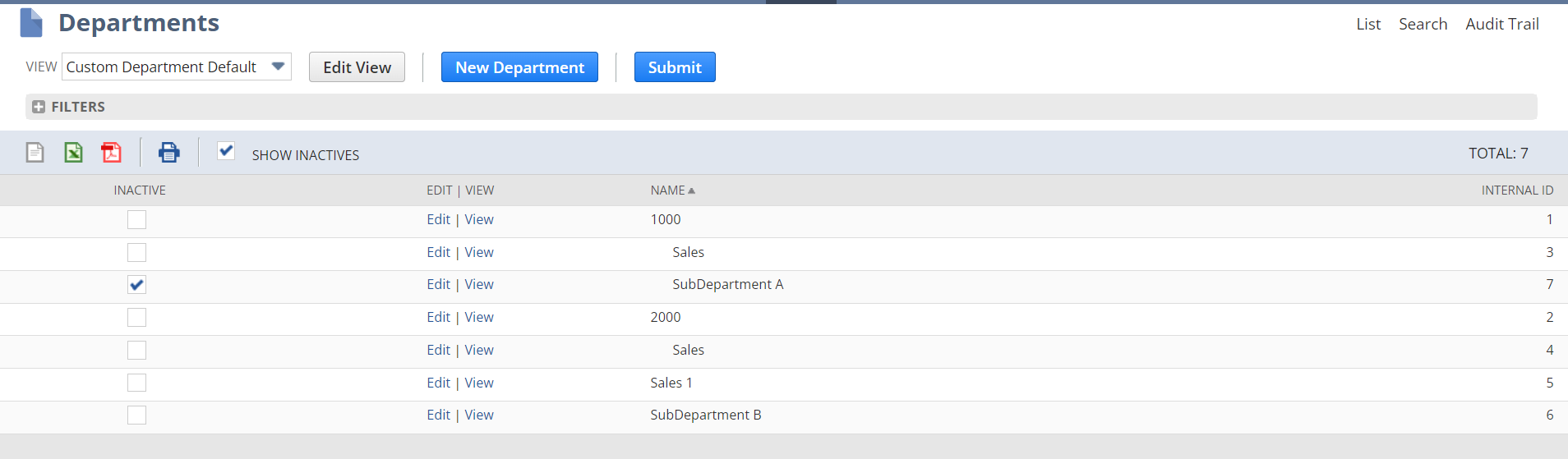
To get the internal ID of the Department:
- Setup > Company > Departments > List
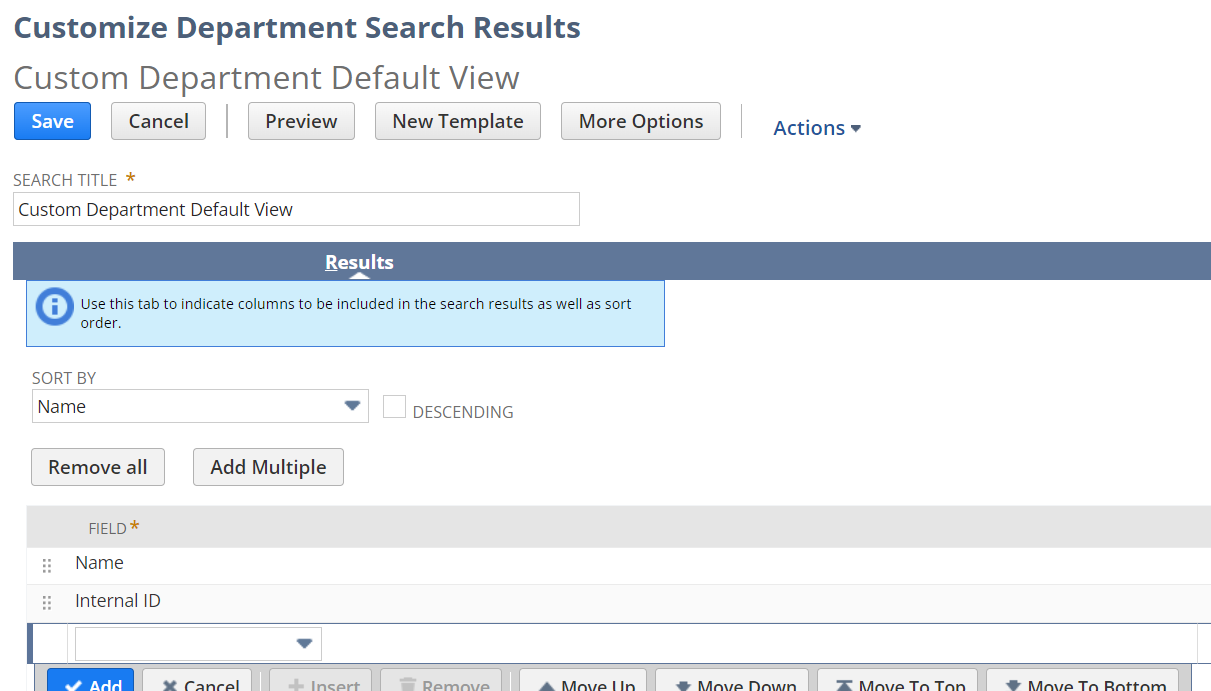
- Customize the View and add the Internal ID

Re: Credit Card to pay employee expense reports
These SuiteAnswer Articles can help:
Re: Current Inventory Snapshot Report Not In Matrix Format
@Ely Gulen-Oracle. Thank you. We were able to build it using Quantity to Order, but it is Subsidiary specific so you have to restrict view. Was hoping we could get it in one report but if this is the only option we will make it work. The Qty on Sales Order had to be a formula Committed + Backorder.


Re: Custom Transaction Sublist Fields not working
As Able said, update the source list to Item. This should fix your sourcing issue.
~angela
Re: How to adjust Estimated Weight and # of package on Return Label if Integrated Return Label is on
Hi @Elham Mahyari,
I see, unfortunately upon checking there is currently no feature that would support this functionality.
Since I was also not able to find an existing enhancement request for this you can go to SuiteIdeas page to create a SuiteIdea about this.
I apologize for the inconvenience this is causing you.
For other users who may have an insight on this, or was able to come up for an alternative, please feel free to comment here.
