Best Of
Re: Company Bank Details
Hi @User_ECQOX,
Kindly confirm if you have the Japan Localization bundle installed in your Account.
Thank you! 😊

Re: What are best ways to check performance of customer NetSuite account
Hey @Naresh_-Oracle,
The APM is the best tool for analyzing the performance of NetSuite workflows and scripts and their impact on various records.

Re: What are best ways to check performance of customer NetSuite account
Double click on the 'NetSuite Logo' on the users dashboard. This will show the page load times similar to this:
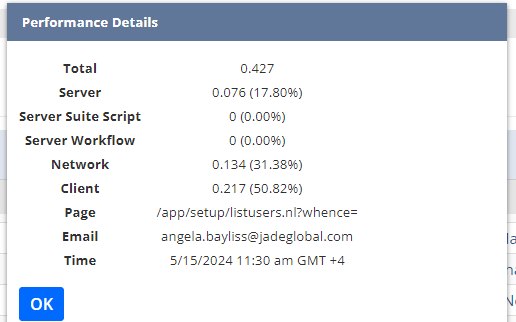
There you go!
~angela

Re: SCA|How do we arrange the fields in a specific order on the PDP page?
Hi Guys,
I am able to resolve the issue. Thank you so much for your help and support.
Best regards,
Shubham Singh.

Re: SavedSearch/Report that finds sets of items to report number of possible builds..
Hello, everyone! We invite you to join the conversation and share your valuable insights with us.
--
In case you know someone who is new to NetSuite, we encourage you to direct them to our newly launched "New to NetSuite" page. This page is specifically designed to offer them information and guidance and help them make the most out of their NetSuite journey. Click here for more details.

Re: SavedSearch/Report that finds sets of items to report number of possible builds..
Hello, everyone! We invite you to join the conversation and share your valuable insights with us.
--
In case you know someone who is new to NetSuite, we encourage you to direct them to our newly launched "New to NetSuite" page. This page is specifically designed to offer them information and guidance and help them make the most out of their NetSuite journey. Click here for more details.
Re: SuiteScript > format.format > INVALID_FLD_VALUE
Hi
To format the date and time value "2024/01/29 09:26:00 am" using the N/format module, you can use the following code:
var formattedDateTime = format.format({

    value: new Date('2024/01/29 09:26:00 am'),

    type: format.Type.DATETIME,

    timezone: format.Timezone.ASIA_HONG_KONG

});
This code will format the provided date and time value according to the specified format type (DATETIME) and timezone (Asia/Hong Kong). Please note that you may need to adjust the timezone value based on your specific requirements.
Regarding the issue you mentioned with the "custrecord_quote_update_time" field, if you are encountering an error message stating "INVALID_FLD_VALUE" and "You entered an invalid field value for the following fields," it is likely related to the specific field and record you are trying to update. You may need to ensure that the provided value is in the correct format and meets the requirements of the field you are updating.
If there are conflicts between the AM and PM times when updating the field, you may need to review the field's settings and any business logic or restrictions in place to determine the cause of the issue.
Hope it is helpful!

Re: Project Tasks availability in Webservices
Hi,
Upon checking, in SOAP and REST, the Project task field is not included in the purchase order reference page. However, ProjectTask record is exposed.
SOAP
- purchase order reference page.
- ProjectTask reference page.
REST
- purchase order reference page.
- ProjectTask reference page.
Thank you!

Re: Project Tasks availability in Webservices
Hi @Vernita as per @Richard James Uri-Oracle the Project task field is not included in the purchase order reference page. However, ProjectTask record is exposed.
Re: Project Tasks availability in Webservices
Hi @Vernita
When creating a purchase order via SOAP or REST, it is typically possible to populate the project tasks field at the line level. The specific method and parameters may vary depending on the API and integration being used. You would need to refer to the documentation or API reference of the particular system or platform you are working with to understand the exact procedure for populating the project tasks field.
Regarding the thread you mentioned, if it states that the project tasks field is not accessible via CSV uploads, it means that when importing data using CSV files, the project tasks field may not be included or supported for direct population. In such cases, API-based integrations would be the recommended approach to populate the project tasks field at the line level of a purchase order.
Hope it is helpful!