Best Of
Re: Can create Advanced Intercompany Journal Entries but can't edit existing JE's
Hello @User_75YL8
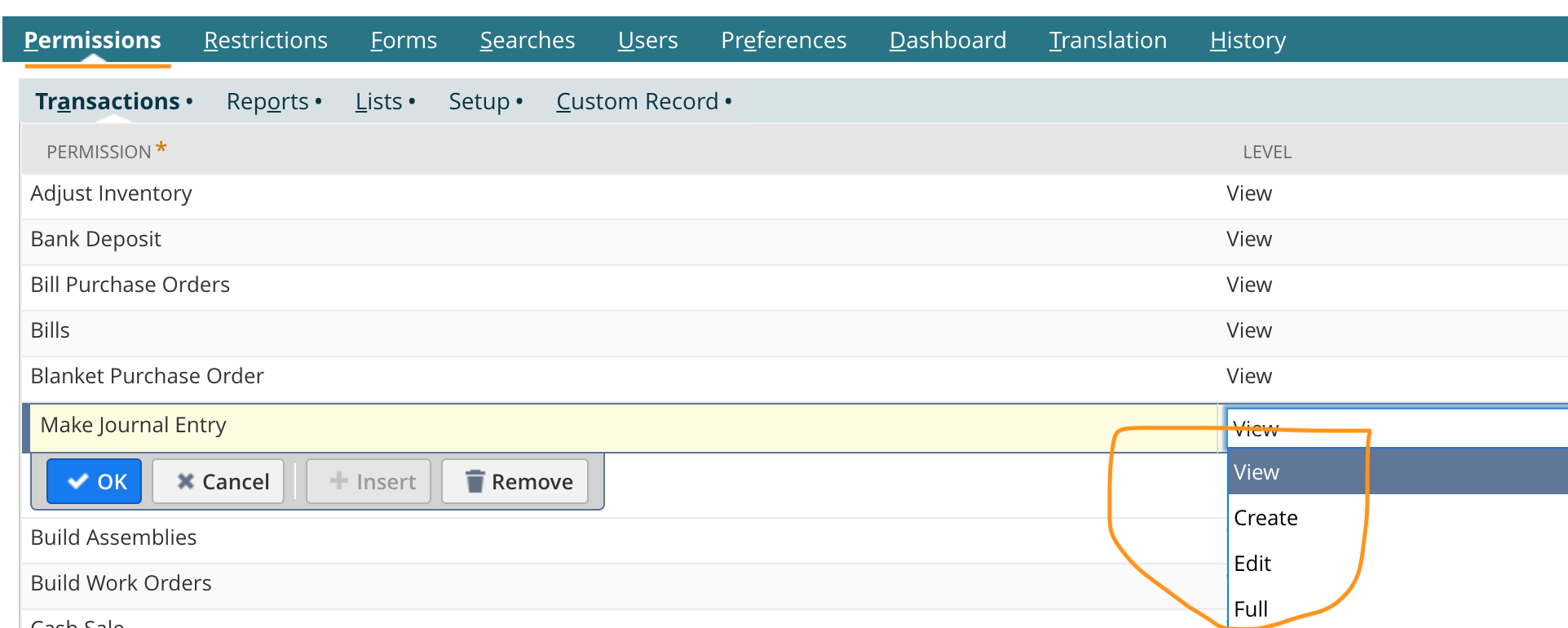
Pls check your custom role permission for Journal Entry transaction - Full
Using Administrator role, navigate to Setup > Users/Roles > Manage Roles
- Click edit on the custom Role
- Permissions tab > Transactions subtab
- Make Journal Entry > Set Level to Full
- Journal Approval > Set Level to Full and
- Save.

Re: Changing Subsidiary Currency
Hello @User_XQ321
Yes by default, the system uses the currency of the parent-subsidiary.
If you have not entered transactions for a subsidiary, you can change the base currency to Editing/delete the Subsidiary Records.
Re: How do I find a transaction missing from the bank reconciliation page?
Hello @User_PVAQ9
Pls check your accounting preference:
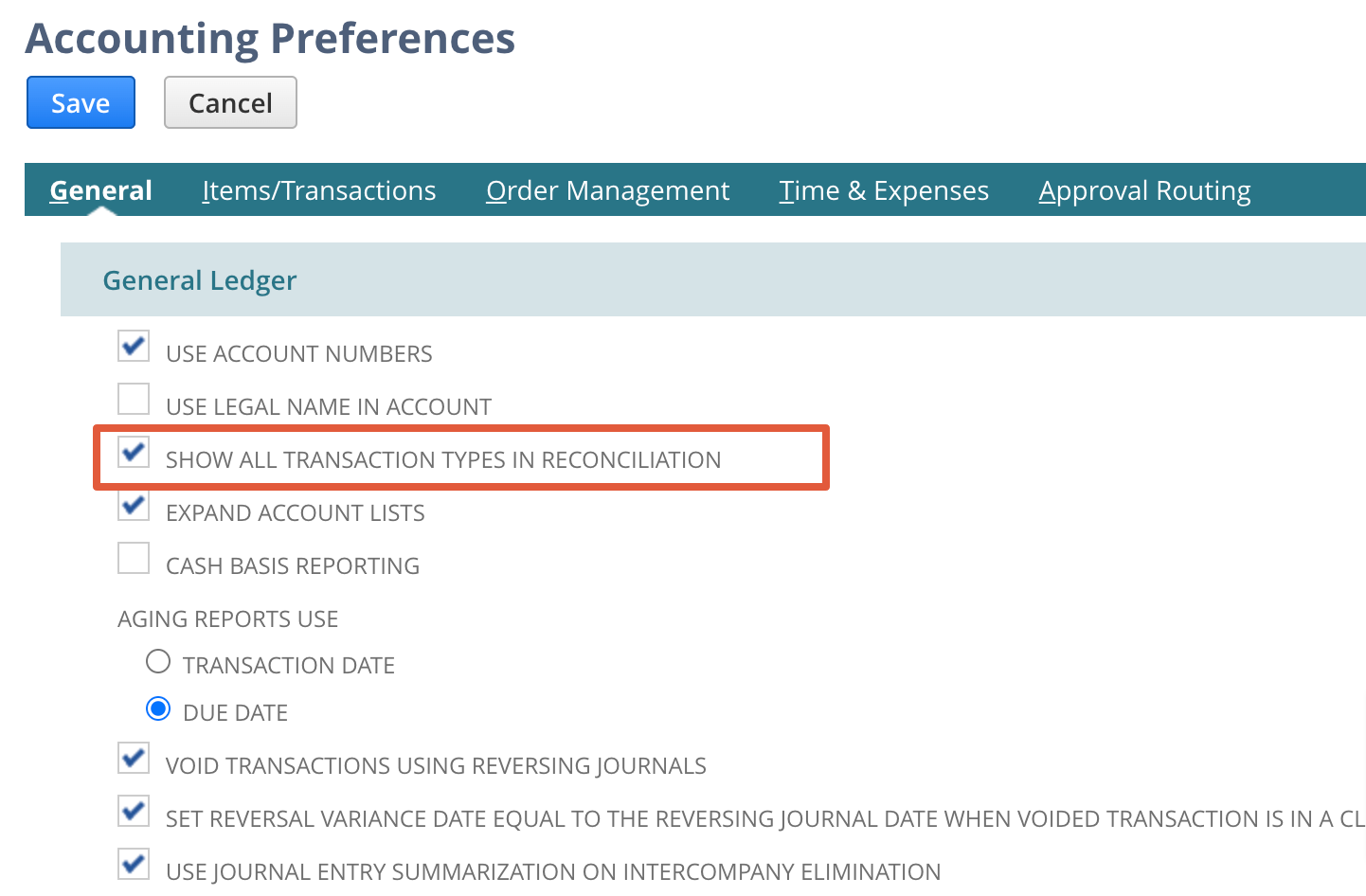
Check this box to display all transactions in the reconciliation pages, including positive or negative amounts of certain transaction types.
If you check the box and then reconcile a statement, you cannot clear the box unless you reverse the statement reconciliation.
Re: 2 sets Exchange Rates
Hello @Kedalene
No. But you can set up different rate types at the account level. There are three rates available in NS.
Lists - Accounts - Edit/New- General Rate type
The Current rate type is based on the currency exchange rate that is effective at the end of the reported upon period. This rate is the default for most balance sheet accounts.
The Average rate type is calculated from a weighted average of the exchange rates for transactions applied during the period to accounts with a general rate type of Average. This rate is the default for income statement accounts and is used build retained earnings.
The Historical rate type is calculated from a weighted average of the exchange rates for transactions applied during the period to accounts with a general rate type of Historical. This rate is used for equity accounts, or owner’s investments, in the balance sheet.
Re: Intercompany Balance Overview and Netting
Hello @User_MC441.
Pls check the below reasons why the New link is not appear
- Intercompany netting supports only matched and linked intercompany transactions with the same amounts on the payable and receivable sides of the general ledger.
- Intercompany Journal Entries – There must be only one AP and AR line for each subsidiary-subsidiary-currency to ensure that the lines are nettable.
- Intercompany Invoice and Intercompany Bill – These transactions are linked through their related purchase order and sales order (arm’s length process inventory transfers). However, these transactions must be matched by having only one invoice and one bill for the same amount, and both must have intercompany entities.
- Multiple invoices linked to one bill, and multiple bills linked to one invoice appear on the Main subtab but are not nettable. These transactions appear only when the Nettable box is clear. These transactions do not have a related transaction in the Pair column.
Re: How do you get Retained Earnings value in a saved search?
I am trying to get the Retained Earnings for the previous month Apr 2022 and it is per Subsidiary.
Below are the details :
Prior Fiscal Year - 6/1/2020 to 05/31/2021
Current Fiscal Year - 6/1/2021 to 05/31/2022
I am trying to reconcile the values first so I will have an idea of how to build the saved search.
Using Answer Id: 89156 -- Retained Earnings Computation as guide, I got the below:
Expected Result : Trial Balance value for Retained Earnings as of previous month for Subsidiary= X,
Apr 2022 = -12,136,130.39
or start of current fiscal year
Jun 2021 = -12,136,130.39
Solution :
1. Get the Trial Balance for the end of prior fiscal Year (Subsidiary = X).
Per TB May 2021 = -8,370,863.85
2. Check if there is a manual journal entry posted on Retained Earnings account for the whole fiscal year.
Transaction Search with the below Criteria:
Posting = T
Period = This Fiscal Year
Account...Type = Equity
Account = Retained Earnings Account showing in Trial Balance
Results
Setting - Consolidated Exchange Rate = None
Actual Result : -5,593,824.54
3. Check the Net Income for the prior fiscal year.
Run Standard Income Statement Report
Period = Custom, From Jun 2020 To May 2021
Subsidiary = X
Net Profit/Loss 3,765,266.54
Calculation :
Per TB May 2021 = -8,370,863.85
Manual JEs = -5,593,824.54
Net Profit/Loss From Jun 2020 To May 2021 = 3,765,266.54
I just realized the current fiscal year's retained earnings seems to be just the TB May 2021 and Net Profit/Loss From Jun 2020 To May 2021
-8,370,863.85 + - 3,765,266.54 = -12,136,130.39
Will try to check if the same is true for other subsidiaries

Re: Restricting access to File Cabinet while not hindering ability to drag/drop/drop in records
Hello @User_75YL8,
Thank you for posting a new thread!
Please allow some time for the members/gurus to check on your concern and get back with more information.
To our members, please feel free to share your thoughts on the thread.
Thank you!

Re: Picking Ticket blank column
Hello @OliverK,
I have tried the code on my test account and it works on my end. We need customize the Sales Order form and show the Committed field under Sublist fields. Kindly check the steps below:
- Open the Sales Order
- Navigate to Customize > Customize Form
- Click Sublist Fields
- Mark the checkbox beside Committed
- Click Save
Please let me know if this solved the issue.

Re: Sales order line level Billing schedule with different start date
Hello @Hormese Paul ,
Unfortunately, it seems to be a limitation of our system. Please, find below the Enhancement request created for this functionality:
# 76554 Sales Order > Items tab > Line Items > Set Billing Schedule Start Date and End Date.
Currently the Billing Schedule Start Date cannot be set per line level, the only possibility is to create separate Billing Schedule for each line or use Recurrence Frequency.
You may vote for this enhancement through SuiteIdeas to increase its points and have it possibly included on NetSuite's future releases.
Thank you for your understanding.
“Kindly click "Yes" on "Did this answer the question?" if you find the reply on your thread helpful. This will aid the others with the same question to easily find the correct answer. Thank you!

Re: How to show/hide fields between company/individual on lead/prospect/customer
Hello @User_75YL8,
Good day! ?
Upon checking, there's no standard way to hide certain fields on the Lead form depending on the Type selected. However, I was able to create a Workflow that gave me the desired result. You can check this on your end as well.
Note: The Workflow below will hide the Sales Rep field on the Lead form when the Type is set to Individual. You can change the field as necessary.
- Navigate to Customization > Workflow > Workflows > New
- Set the following fields on the Basic Information:
- Name = set the name of the Workflow as preferred
- Record Type = Customer
- Sub Types = Lead
- Execute As Admin = checked
- Set Initiation = Event Based
- Under Event Definition, set the following :
- On Create = checked
- On View or Update = checked
- Note: Check the 'On View or Update' box if you would like to run the Workflow on existing records
- Trigger Type = ALL
- Click Save
- Click on the State 1 box
- At the right-side of the page, click on the New Action link
- Select Set Field Display Type
- Note: This action would set the Sales Rep field to hidden when Individual is selected.
- Set the following fields:
- Trigger On = After Field Edit
- Triggering Client Fields = Is Person
- Set Condition as below:
- Field = Is Person
- Compare Type = checked
- Under the Parameters section:
- Select Sales Rep on the Field drop-down
- Display Type = Hidden
- Click Save
I hope this helps and will work on your end. It would be best to reach out to your in-house developers to further discuss if you have other business requirements.
If you find this reply to your question as helpful, others with the same question might find it helpful as well. By marking “Yes” on the “Did this answer your question?”, you’ll be able to aid the community to find the solution much easier and faster without the need to read through all the replies.
