Best Of
Re: WMS Custom Dynamic Message Source Line Field
@Mikko De La Fuente-Oracle Yes it was visible. I was able to find the solution though.
The correct code is:
{{record:salesorder:{{state:dataRecord:scriptParams:transactionInternalId}},item:line:{{state:dataRecord:scriptParams:transactionLineId}}-custcol_fulfillment_group_id}}
The problem is that I had a space after the comma before item:line.
Thanks for your help!
 Kaden B
Re: currency revaluation lines count exceeding
I think currency reval generates each month and reverses each month but on every transaction in the database.
Take a look at the Suite Answer ID: 82643 as a start and all the related links at the bottom of this one.
 CDuf
CDuf
Re: Vendor invoice import
Hi @Dallas H,
Good day! As per checking your file, if you noticed on the external ID field, those with the same external ID were not lined up consecutively, thus resulting the system to finish creating the transaction record when it detects another external ID. For example the first two lines external ID is 5769 then the third line is 1264863. When the system sees the 3rd line, it will assume that the transaction record with external ID 5769 is already finished and complete it. So when another line has the same external ID, the system will result in an error and notify you that a transaction record were already saved under that external ID.
For remedy on this one, you can reupload again but not as new in the upload type but under update. So that it will update those already created transaction record.
Hope this helps. Thanks!
Best regards,
Emil
 Emil T.
Re: Vendor invoice import
Hi @Dallas H,
Good thing it worked, maybe the update need something else for the mapping. Anyway, usually for the Account since you are doing vendor bill, it seems it is asking for the AP Account? Did you check those vendors if you have assigned a default AP account? But it seems from your file you assigned the account with the Internal ID. So if it is okay with other accounts, it should have no problems. Maybe need to check the vendor and the account record to review possibility on the errors.
Hope it somehow helps. Thanks!
Best regards,
Emil
Emil T.
Re: Specify a before date in saved search
Okay it turns out I was just making it more complicated than it need to be, answer was:
CASE WHEN ({type} = 'Sales Credit' AND {createdfrom.trandate} < '01/07/2022') THEN {custcol_pct_titan_cost} ELSE NULL END
 OliverK
WATCH: Bill Payment Using A Currency Different from the Vendor's and Company's Base Currency
In making Vendor Payments, users are able to only select Bank Accounts having the same currency as the Vendor or the Company's base currency. This video demonstrates how to create a Vendor Payment using a currency that is different from the Vendor or the Company's base currency.
Re: WIP - Saved Search showing WO Qty, Qty issued, and Qty consumed
Hi @KNason76,
I also have the same dilemma before. What I did was create a custom body field (decimal number format), then apply to the form. After that I created a workflow for the transaction for getting the value from the wo quantity. So I added the action set field value, during entry, then on the formula, put the internal ID of the standard field showing WO qty. And that is what I source for the saved search. Only problem is that it is prospective approach so your data before will not have data but you can try to edit save the transaction to update the field. Hope it helps. I am also still looking for better solutions, so far that is what I have done.
Best regards,
Emil
Emil T.
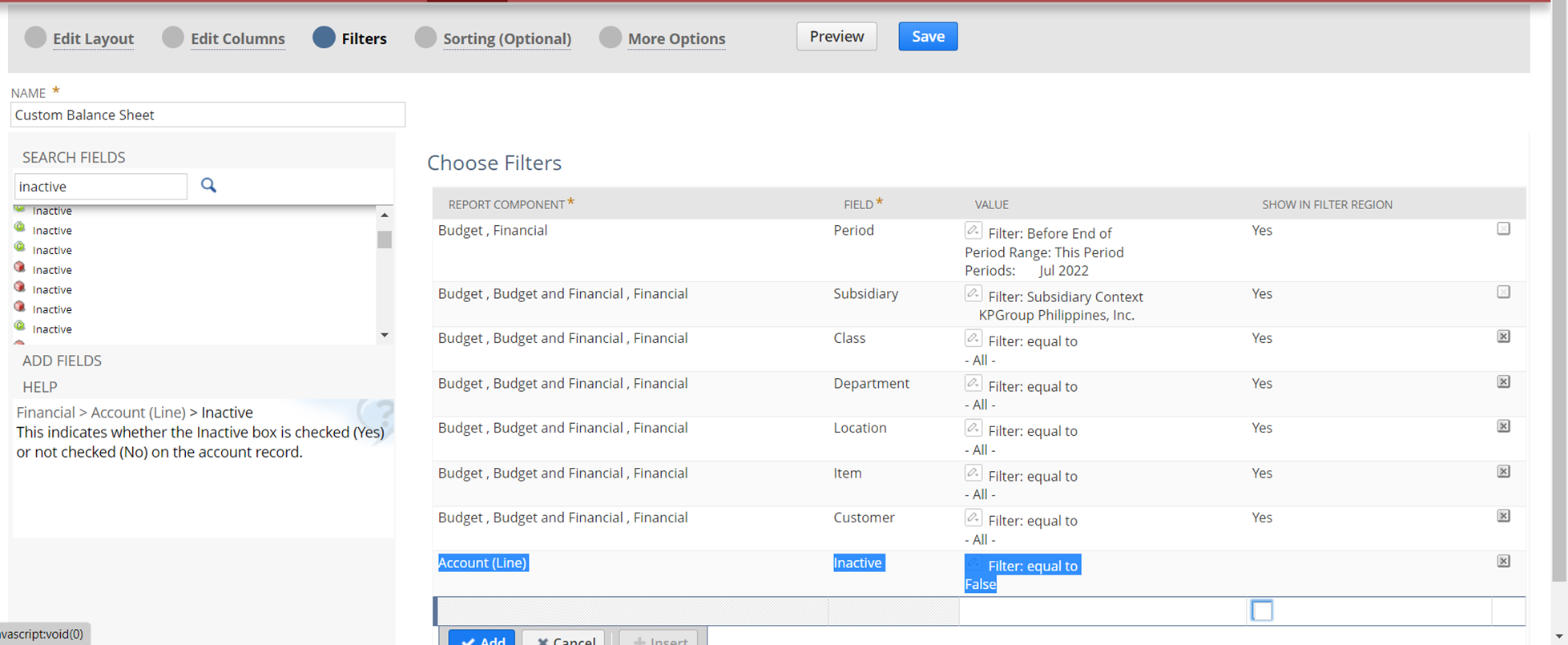
Re: How to eliminate inactive accounts from BS and PL report which SHOW ZEROS.
Good day. Did you try to edit the filter on the report and select the filter for inactive? Please refer to image below.
Best regards,
Emil
Emil T.
NetSuite Admin Tips: Printing Company Logos on Records

When printing Transaction records, users reported that the Company Logo printed is not the same in the Logo configured in the Company Preferences. Different reasons can be the cause for this scenario.
One reason for this is because of the Custom Form's configuration, which is applicable when users are using Basic Printing. In this scenario, there is a selected value in the Custom Form's Logo field which makes the Printed Template display the Logo selected in the Field. The Custom Form's Logo will be followed instead of the Company Logo in the Company Information page.
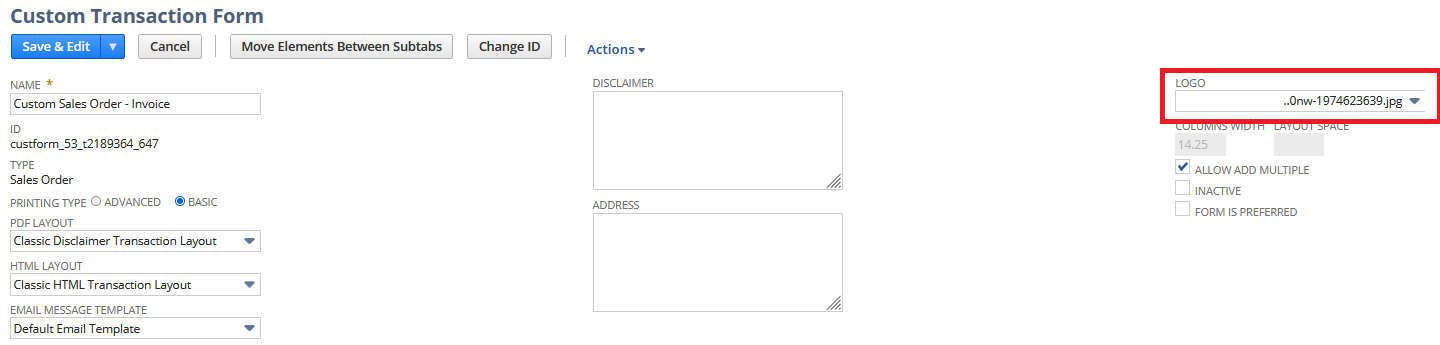
Another reason for this is because of the source code of the print template, which is applicable when users are using Advanced Printing. In this scenario, there is a source code that specifies the Image file to be sourced by the template. To print the Company Logo in the Company Information page, users should change the highlighted line of code to ${companyInformation.logoUrl}:
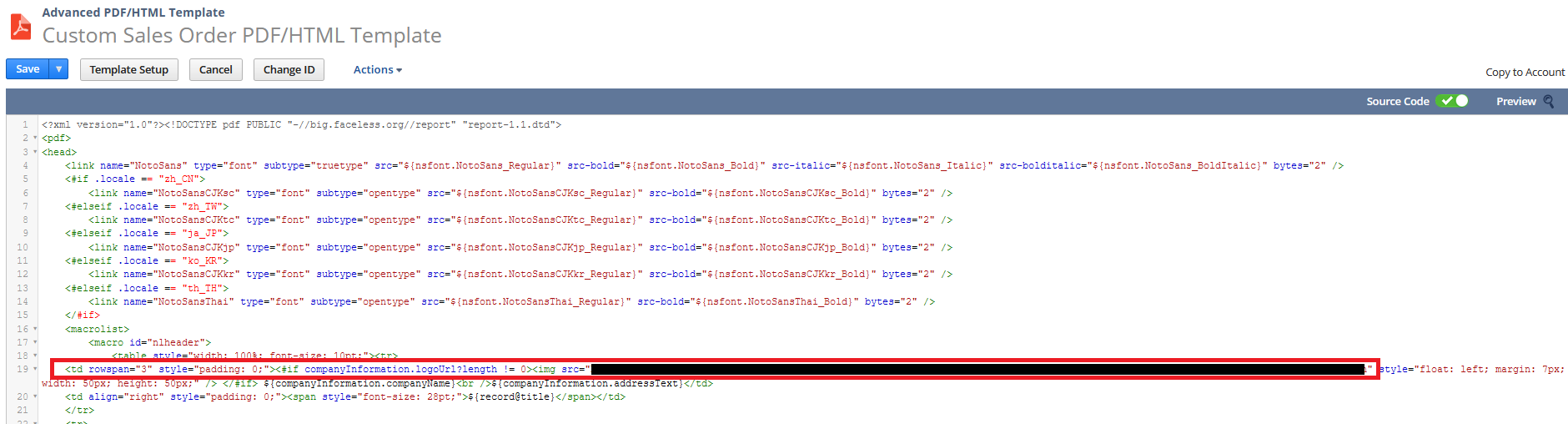
To other users, do you have any tips when printing specific Logos on your template? We encourage you to share it to the community.

Re: Why is vendor name not flowing through to the income statement for prepaid amortization entries?
Hi @User_HNJ22
It would depend on which Income Statement Saved Search is being used in the integration. If you do not specifically know which one:
- Navigate to Planning & Budgeting tab (in NS) > Jobs > Activity Logs. You'll see the NSPB Saved Searches being used in the integration when the jobs are sent to NSPB Data Management for processing.
- Take note of the Saved Search name for Income Statement Transactions then open that Saved Search in Edit mode
- Navigate to the Results subtab and look for the Relationship column. Most customers are using the out-of-the-box NSPB Saved Searches coming from installed NSPB bundles so if there was no modification/little modification during your implementation, the Customers and Vendor formula will most likely be found under the Relationship column and with this formula:

If you would like to improve how Vendors are flowing through to NSPB, all the changes to be done in the NetSuite side and NSPB (EPM Cloud) application will have to be done at once. This typically requires consulting hours since data will need to be validated once a new data source in NSPB is used. Hope this helps!