Best Of
Re: Why can't i see all fields under workflow action parameters?
Hi @Philly_NS,
Good day! Have you tried using {itemid} on the formula? Here's what I've tried on my test account:
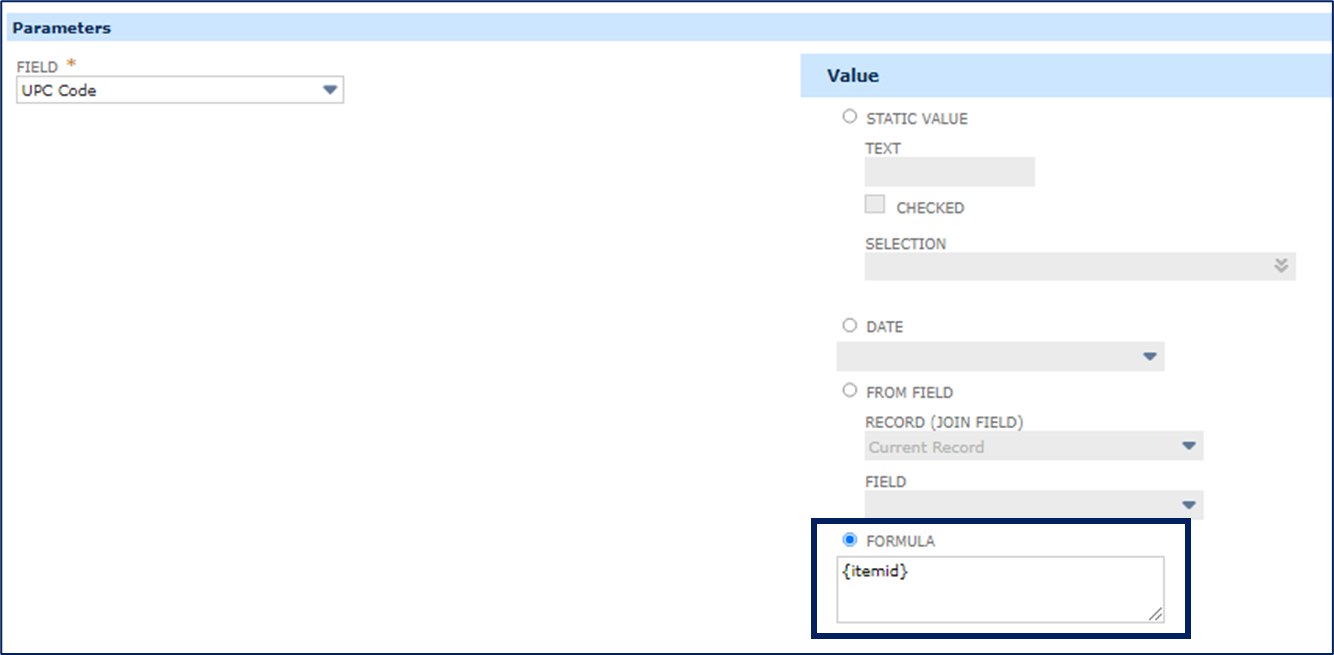
Let us know if this helps!
__
If you find this reply to your question as helpful, others with the same question might find it helpful as well. By marking “Yes” on the “Did this answer your question?”, you’ll be able to aid the community to find the solution much easier and faster without the need to read through all the replies, and you will also get closer to earning your next Answer Accepter badge.

Re: Number of Years/Months since Hire Date in a Saved Search
Hi @User_7BO09 ,
Please try to check the following SuiteAnswers articles for date differences:
Create Custom Field to Calculate Difference Between Two Date Fields in Months
Create Custom Field Calculating Date Difference
I hope these details help. Best regards,

Re: Identifying Assembly parts not in correct subsidiary
I was able to create 2 saved searches (as stated above). Am just waiting to hear back from the user who requested this to see if it satisfies requirements. Will certainly let you know as soon as I know anything for sure. Thank you!


Re: Suitele list set color on field
Hi,
Upon checking, there's an existing Enhancement requests for this:
- 339129 SS > Change field background color using SuiteScript (Client and Server
sides) - 182545 SSS > to be able to set the background color for the custom sublist
You can vote for this enhancement on the SuiteIdeas page. See 10054: Voting for Enhancements

Re: Foreign Currency Transactions
HI @User_UEJ7U!
The value you select in the Subsidiary Context list for a report determines the data and currency to be used for amounts. The currency is the base currency of the subsidiary you select.
There are two types of financial reports that you can generate.
1. Subsidiary Level of Report - These reports pull out the amounts based on the transaction amount at the time that the transaction was created
2. Consolidated Level of Report - These reports shows the consolidated data for all child subsidiaries of the consolidated parent subsidiary, including elimination subsidiaries. As such, The consolidated exchange rate types and the types of accounts that use them are as follows:
Average – The weighted average of the currency exchange rates for all transactions posted during the period to accounts with a rate type of Average. This rate is used to translate accounts in the income statement and to build retained earnings.
Current – Also referred to as ending rate. This rate is the currency exchange rate that is effective at the end of the reported upon period. This rate is used for most asset and liability accounts in the balance sheet.
Historical – Same as Average rates, except for accounts with a rate type of Historical. This rate is used for equity accounts and owners’ investments.
Viewing the Financial Reports at a Consolidated Level, the system would be using the Consolidated Exchange Rates (Lists > Accounting > Consolidated Exchange Rates) depending on the General Rate Type of the account (Lists > Accounting > Accounts > Click Edit on a specific account to view).
For more information, you can check out SAID 7752.
Hope this clarifies! :)

Re: SuiteScript/SuiteCloud communication with MS Dataverse (Dynamics 365)
Hello, everyone! Feel free to participate in the discussion and share your valuable insights.
In the meantime, you might be interested in participating in our Weekly Quiz. You only have until April 18, 2PM ET to comment on your answers and earn rewards! Click here for more details.
Re: Change table in Bill of Materials printout
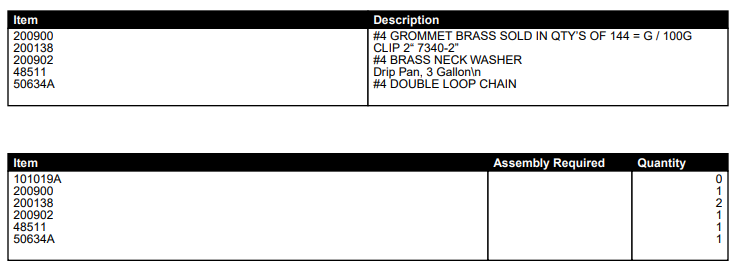
As you can see, I was able to get the Item number to show up before the Description in the top table, but I cannot find any indication where the bottom table comes from or how to edit it:
Re: Apply Discount Code To Item Automatically
@Grace Catabian-Oracle Thank you for the information!