Narrative Insights is Temporarily Unavailable due to an Infrastructure Issue. Learn how This Impacts Your Account and What to Expect While the Feature is Disabled.
Best Of
Re: How to make Serial Numbers not Case Sensitive?
Hi @@User_KO3DZ,
Good day! Hope you are doing well. 😊
Upon checking, as a standard behavior, Serial Numbers are case-sensitive.
Currently, the ability to provide users with the option to define a serial number format and remove case sensitivity is not available in NetSuite functionality.
It is logged under Enhancement 52417 Serialized Inventory - provide users with the option to define a serial number format.
You can vote for this enhancement on the SuiteIdeas page.
At this time, there is no documented workaround. But you may try reaching out to your Account Manager should this feature be really needed so it can be consulted with the Professional Services team/Advanced Customer Support. It might be possible through some custom solutions.
To our other members, feel free to share your ideas and suggestions on this. 😊
We appreciate your understanding on this current system limitation.
========================
If you find this reply to your question as helpful, others with the same question might find it helpful as well. By marking “Yes” on the “Did this answer your question?”, you’ll be able to aid the community to find the solution much easier and faster without the need to read through all the replies, and you will also get closer to earning your next Answer Accepter badge.

Re: Oracle NetSuite Regional User Groups
Hi @User_F4V40,
Currently, we don't have one for Australia. However, if it's something you're interested in pursuing, I suggest emailing the team who handles user groups at nsgbu-nsusergroups_ww@oracle.com.
Thank you.

Re: Enabling statistical accounts
Hi @Elina Kourouzidou
Yes @Patrick Fresnosa-Oracle is correct, Pls check your NS license
NetSuite Advanced Financials brings additional financial management functionality. It includes budgeting, expense allocations, and amortization, and statistical accounts.

Re: Customer B2B Portal integration with NetSuite System
Hi, @Veronica Steluta Mincior-Oracle ,
Thanks for your valuable advise.
Yes, we are using import csv widely as it helps to speed up the manual keying the transaction.
alright, will have to check with the solution partner for this case.
Once again, thank you.
Best Regards,
Bee Yook
 Bee Yook
Re: Cannot set employee on expense report
Hello @Vernita,
It is possible to set the value of the employee in the expense report record. But it is identified as Entity in the list instead of Employee.
I hope this helps!
If you find this reply to your question useful, others might as well. By clicking the “Yes” button for “Did this answer the question?” below, you’ll be able to help the community members who might have a similar concern find the answer easier and you will also get closer to earning your next Answer Accepter badge.

Re: Log In failure, can someone help me with this.
Hi @User_84VR3,
Did you try to reset the 2FA settings?
Setup » Users/Roles » User Access Reset Tool
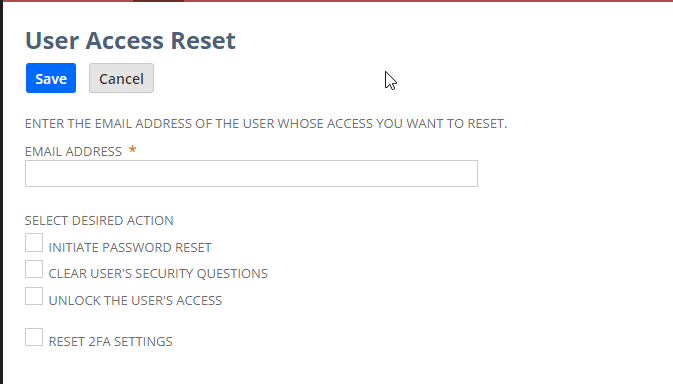
I hope this helps 🙂
Edo

Re: Unexpected Error When Editing A Purchase Order
Hi @nsteresa,
Good day and thank you for posting this new thread!
Hello everyone! We'd greatly appreciate your support in this matter.
Re: Trying to order inventory and assembly items on 1 form.
Hi @Dext3r,
I may be off base here, but your description leads me to believe you are processing the purchase of the assembly item via Outsourced Manufacturing, which unless you are having outside operations performed on components you are providing the vendor, is not needed.
I would check the state of the ALLOW PURCHASE OF ASSEMBLY ITEMS checkbox. This is found at Setup⇒Accounting⇒Accounting Preferences⇒Order Management⇒Purchasing⇒ALLOW PURCHASE OF ASSEMBLY ITEMS. If unchecked, you should be able to check it and then order both types of items on the same PO. Depending on how you want the planning process to plan the purchased assemblies, you may want to change the Item Location Configuration's Supply Type to PURCHASE.
John

Re: Trying to order inventory and assembly items on 1 form.
Hello @Dext3r,
Good day and thank you for posting this new thread!
Hello everyone! We'd greatly appreciate your support in this matter.
Re: Trying to order inventory and assembly items on 1 form.
Hi @Dext3r ,
Please note that when we Purchase Assembly Items, Bill of Materials/Bill of Materials Revision is not needed as it is used on Work Order Transactions.
It is a standard behavior that once you change the Purchase Order Form to Outsourced PO Form, the BOM and BOM Revision fields will be available but you can only process Assembly Items as it will create a Special Work Order.
So it is not feasible to show the BOM/BOM Revision on Purchase Order Form then process both regular inventory and assembly item without any customization.
