Best Of
AskAGuruLive with Ely about Order to Cash (June 19, 2024)
Hello, Everyone! Hope you are having a good day. 😊
This is Ely, NetSuite Support Community Guru for Order to Cash, and I will be LIVE for an hour starting from 1 PM to 2 PM EST to answer your questions.
But before we start, let me remind you of some house rules:
- Post your questions by commenting below. 1 comment = 1 question.
- Some questions may be complex so I would appreciate your patience as I look into it.
- Let me know if the solution works for you or not. That way, I can check again.
You can also ask some non-NetSuite-related questions about me such as my hobbies and interests and I'll be happy to answer them.
Stay tuned as I will be sharing tips and tricks as well. 😊
I would also like to greet the following members who have RSVP'd for today's session:
@Robert Nedelkow-Oracle, @Richard James Uri-Oracle and @Cesarhr95!

New to NetSuite | Understanding the Preferences related to Fixed Asset Permissions and Creation

In this article, we’ll discuss the different General preferences related to Permissions available in the Fixed Asset Management bundle and the effects of enabling them.
How to access the FAM General Preferences:
Navigate to Fixed Assets > Setup > System Setup
The General Preferences Related to Accounting Period
1. Enabling the Post to Next Open Period if AP/AR is locked
When the Accounting Period is locked and a FAM transaction was processed, it will be posted on the last day of the next open period.
2. Disabling the Post to Next Open Period if AP/AR is locked
When the Accounting Period is locked and a FAM transaction was processed, it will be posted on the last day of the period when the transaction was processed.
Here’s a table to help you understand:
Transaction: Depreciation

The General Preferences Related to Asset Creation and Update
1. Enabling the Run Server Scripts on CSV Import
The user needs to enable this to make sure that the FAM scripts will run when creating and updating assets through CSV import.
Aside from enabling this preference, user also need to enable Run Server SuiteScript and Trigger Workflows (Navigate to Setup > Import/Export > CSV Import Preferences) when importing CSV.
2. Enabling the Allow Asset Value Editing
If this is enabled, Administrators, by default, will have full permission in editing the values in the asset record. However, additional roles can be added by selecting them on User Roles box. (Navigate to Fixed Asset > Setup > System Setup > General > Asset > User Roles)
3. Allow Negative Asset Cost
If this is enabled, users who has permission in editing Asset Values will be able to enter negative values for Original Cost, Current Cost, and Residual value fields on the Asset Record
If you are new to the Fixed Asset Management module, check out these related articles as well:
1. New to NetSuite | Account Set up for Fixed Asset Management SuiteApp
2. New to NetSuite | Permissions Needed for a Custom Role to have Full Access to the FAM Module
--
Stay tuned for upcoming articles where we will explore Fixed Assets Management under Basic Accounting Product Area. Follow the New to NetSuite > Basic Accounting to be notified whenever a new article is posted.

Re: NetSuite Connector - Customer Terms
Hello @Amanda Edwards, it seems that you would like to use Terms on the respective customer record as an order filter. However, this is not supported in the system as only order data coming from the storefront/marketplace can be used as order filters, and therefore Terms pre-set on the customer record in NetSuite cannot be used as an order filter. Hoping that this answers your inquiry. Let us know otherwise. Thanks!

Re: How to adjust the decimal places of bill of materials revision quantity
Hi @User_A8ZG8
- Use the steps below
- 1. Go to Items.
- 2. Locate the item record for the component you want to manage rounding for.
- 3. Click on the Purchasing/Inventory subtab.
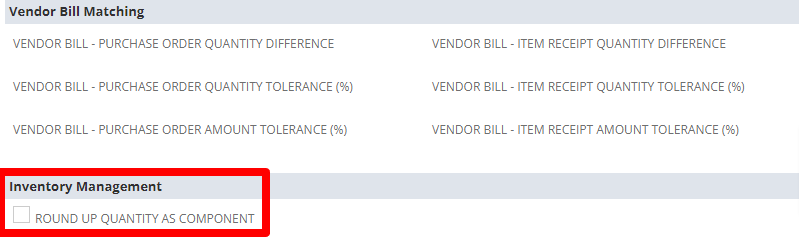
- 4. In the Inventory Management section, look for the setting called Round Up Quantity as Component
- Make sure the box is not checked.
 K Mukesh
Re: NSAW Data Augmentation stuck
OK - after testing a few things the issue turned out to be the username
As we support several NetSuite customer we create an admin username e.g. "netsuitelogin+ABC@ourcompany.com " this way we can then have one email account but several users across many companies.
Data Augmentation does NOT like ' +' - I created another user without the '+' in the name and was able to delete the incorrect augmentation

Re: Seeking Resources for Building Visualizations in NSAW
@Patrick Fresnosa-Oracle Thank you very much for the information!
Re: Invoice Form Selection in Commerce Only Shows Sale Order PDFs
Thanks for your help @Carlo Bernal-Oracle, that lead me to the right place. I also happened to be missing a few permissions.
Re: 2FA Authentication
Hi @Elina Kourouzidou
Could you please confirm which browser you are using to access the system? Additionally, can you check if you have enabled the "Remove browsing data every time when they close the browser" setting? If this setting is enabled, the system will prompt you to enter 2FA every time you log in, even if you select the "remember me for 30 days" option.
Thank you.

Re: Record link not working on emails
Hi @Angelica Mae Segador-Oracle and @User_ZCWF3!
I found a solution through your suggestions above!
Thank you!

Re: Can I turn a customized standard report into a saved search to use it in Reminder portlet?
Hello,
You can not convert a saved report into a saved search. You can recreate the report into a saved search, but some of the criteria won't be listed in the 'filters' area of your report. For example, if the report is open sales orders, the filters won't show the transaction type=sales orders & Status = not closed, billed, etc.
Reports can be added to your dashboard as report snapshots. Searches can be added via the 'custom search' portlet. If you recreate a report as a saved search, you can then add it to your dashboard as a custom search or dashboard reminder.
I hope this helps!
~angela
